Introduction
A suspended TikTok account can feel alarming, especially if you didn’t get a clear reason. The good news is that most suspensions are temporary and fixable if you act correctly. This guide walks you through exactly how to check your suspension status, appeal it, and avoid the mistakes that turn a short suspension into a permanent ban.
Why TikTok Suspends Accounts
TikTok’s moderation system runs on a mix of automated detection and human review. Both can flag an account, and both can make mistakes. Common triggers include:
- Repeated Community Guidelines violations (real or misidentified)
- Copyright claims from music or video content
- Unusual login activity that looks like a hacked account
- Automation tools, bots, or rapid follow/unfollow behavior
- Multiple reports from other users, even if the content was fine
- Suspected fake account or underage account signals
Because the system is largely automated, it’s entirely possible to get suspended without breaking any rule you’re aware of. That’s why an appeal exists, it puts a human in the loop.
Suspended vs. Banned: What’s the Difference
These two terms are frequently confused and used as if they mean the same thing, but they describe different problems, each requiring its own specific solution.
Temporary suspension Your account is locked for a set period, or until you complete an action like verifying your identity or removing a video. You usually see a message when you try to log in, and the account often restores itself once the issue is resolved.
A permanent ban means TikTok has completely removed the account, typically due to repeated violations or a serious breach of its policies. Unlike temporary restrictions, it cannot be resolved by waiting; the only way to regain access is through a successful appeal.
If you’re dealing with a TikTok account temporarily suspended and can’t log in, skip to the login troubleshooting steps below. If you’re facing a TikTok permanently banned account, jump straight to the appeal section, since login troubleshooting won’t help there.
Requirements Before You Start
- The contact information associated with your TikTok account.
- Access to that email or phone (for verification codes)
- An updated TikTok app or access to the TikTok website at TikTok.com.
- A government ID, only if TikTok specifically requests identity verification
- Patience, most appeals take 24 hours to 7 days to process
Step-by-Step Guide to Recovering Your Account
Step 1: Try Logging In Again
Open the TikTok app and attempt to log in normally. If the account is suspended, you’ll typically see one of these messages:
- “This account has been suspended”
- “Your account is temporarily locked”
- “You’ve been permanently banned from TikTok”
Note the exact wording, it tells you whether you’re dealing with a temporary or permanent action, which changes your next steps.
Step 2: Check for an In-App Notification
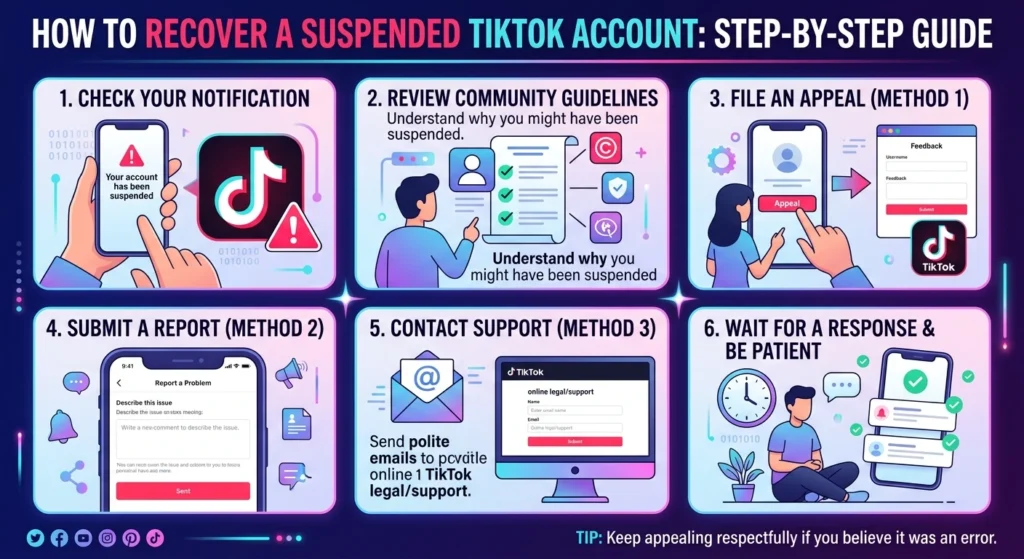
Before you assume the suspension is random, check Inbox > System Notifications if you can still access it, or the email tied to your account. TikTok often sends a reason, such as a specific video that was flagged or a policy category that was violated. This context makes your appeal far more effective.
Step 3: Wait Out Short Suspensions
If the message indicates a temporary lock (commonly 24–48 hours for first-time or minor flags), the simplest fix is to wait. Avoid creating a new account or repeatedly trying to log in during this window, since both can extend the lock or trigger additional review.
Step 4: Appeal the Decision Through the TikTok App
If the suspension does not resolve on its own, or if your account has been permanently banned:
- Try to open the app. If you can access a “Submit Feedback” or “Appeal” button on the suspension screen, tap it.
- Choose the option that best matches your situation.
- Write a short, factual explanation. Avoid emotional language, stick to what happened and why you believe the action was incorrect.
- Submit your request and note any confirmation message or reference number you receive.
Step 5: Use TikTok’s Official Appeal Page
If you are unable to access the app, you can submit an appeal through TikTok’s official ban appeal form using a web browser instead. This is the correct TikTok account banned website to use, always go through TikTok’s own domain rather than third-party “unban” services, which are almost always scams.
- Go to TikTok’s official support/appeal page.
- Choose “Account” as the issue type, then select “My account was suspended” or “My account was banned.”
- Enter the username, email address, or phone number associated with your TikTok account.
- Fill in the details of your appeal, including any relevant context from Step 2.
- Submit the form and save any reference number provided.
Step 6: Verify Your Identity if Requested
For some suspensions, particularly those related to suspected bot activity or underage use, TikTok may ask for identity verification. Carefully follow the in-app instructions; unclear images or inconsistent information are among the most common reasons appeals are denied.
Step 7: Monitor Your Email and Notifications
TikTok typically responds to appeals via the registered email or in-app notification. Check both regularly, and respond promptly if TikTok requests additional information, slow replies can reset the review queue.
Step 8: Reapply if Denied
If your first appeal is denied and you genuinely believe it was a mistake, you can usually submit a second appeal after a waiting period (often 30 days). Use this time to gather any evidence supporting your case, such as screenshots proving the flagged content didn’t violate guidelines.
How to Appeal a TikTok Ban
If you’re specifically dealing with a TikTok permanently banned account and want to know how to recover it, the appeal is your only path back. A few things that meaningfully improve your odds:
- Be specific when explaining your case. Instead of writing, “I think this was a mistake,” provide relevant details, such as: “This suspension references a video I posted on [date], which did not contain the content described in the notice.”
- Don’t create a new account while appealing. TikTok can treat this as evasion, which damages your appeal and can get the new account flagged too.
- One appeal at a time. Submitting multiple appeals in quick succession doesn’t speed things up, it usually slows the review down.
- Keep it professional. Reviewers see a high volume of appeals; a clear, calm explanation stands out more than a long, emotional one.
Pro Tips
- Screenshot the suspension message the moment you see it, you’ll need the exact wording for your appeal.
- Check whether any recent video, sound, or comment could realistically have triggered a flag before assuming it’s random.
- Keep your account’s contact information (email and phone) up to date at all times, so you’re never locked out of the appeal process itself.
- If you use TikTok for business or creator income, register a backup contact method now, before you ever need it.
- Avoid third-party apps promising to “boost,” “auto-follow,” or “auto-comment”, these are common triggers for suspension.
Common Mistakes
- Creating a second account immediately. This is the single most common mistake and often worsens the situation.
- Spamming the appeal button. Submitting the same appeal repeatedly doesn’t move you up the queue.
- Using unofficial “unban” services or websites. These are not affiliated with TikTok and can put your personal information at risk.
- Ignoring the suspension reason. Appealing without addressing the specific flag reduces your chances of approval.
- Ignoring identity verification requests. Leaving these unanswered typically results in the suspension becoming permanent.
Frequently Asked Questions
Think your account was suspended by mistake? Check your profile health first. 👉 Analyze Your TikTok Profile with TikView, Free.