TikTok Story Viewer
Enter any public TikTok username or profile URL in the TikTok Story Viewer to check for available Stories instantly. Use your browser without downloading an app, creating an account, or installing anything.
Only displays publicly available TikTok Stories. No access to private accounts or restricted content.
What Is TikTok Story Viewer?
TikTok Story Viewer is an online browser tool that lets you search for a public TikTok username and check whether that account has active stories. No TikTok account is required.
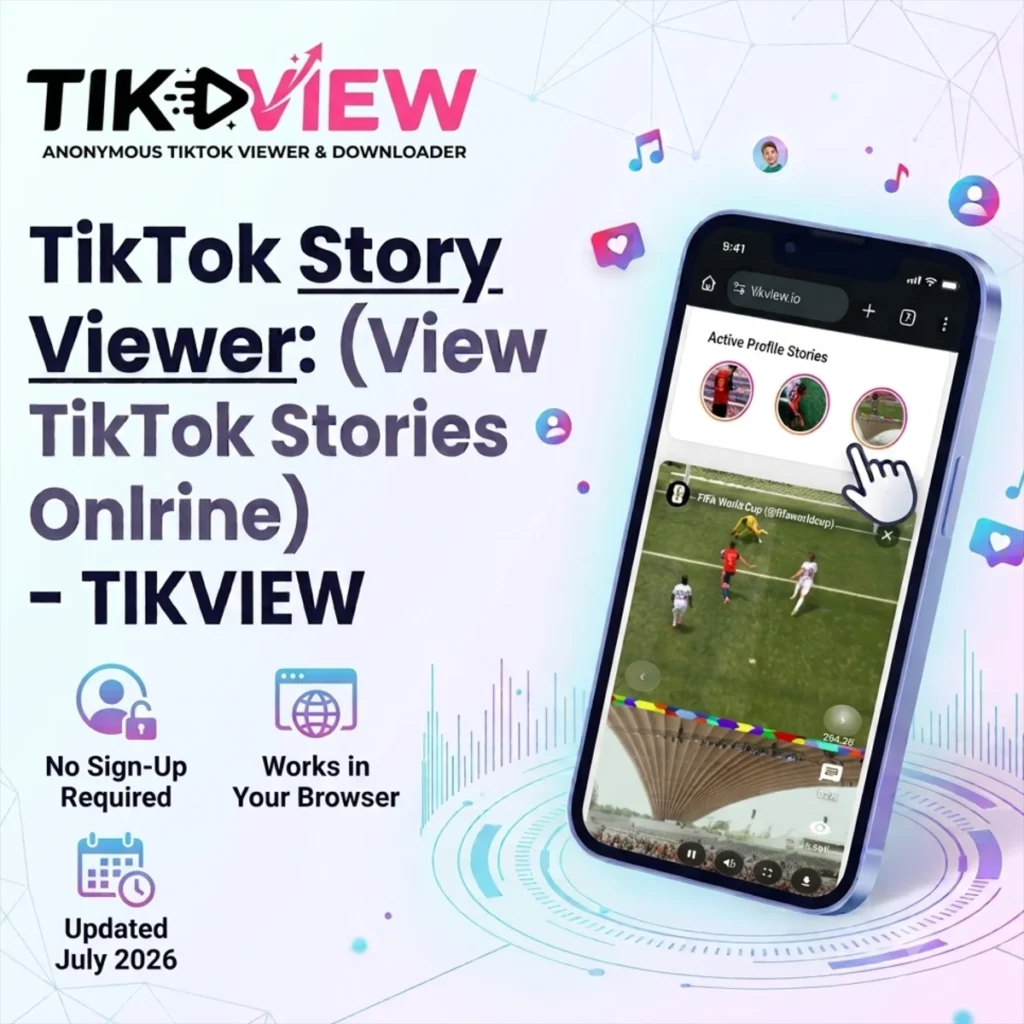
Using a Story Viewer is easy. Paste the TikTok creator name or profile link into the search bar, press Enter, and the available Stories appear directly in your browser. There’s no waiting around, no sign-up form, and nothing to install on your phone or computer. This makes it a great option for US(United States) and UK(United Kingdom) users who want a fast way to catch up on trending content, check a favorite creator’s latest Stories, or look into a competitor’s activity, all in one visit.
Since the tool runs entirely through the browser, it works on any device, including iPhone, Android, tablet, or desktop, and it doesn’t save your search history or ask for personal details. Just search, view, and move on with your day. It’s a quick and simple way to access public TikTok Stories whenever you need to.
How Do TikTok Stories Work?
If you’ve ever wondered why a story disappears the next day, or why some accounts show one and others don’t, it comes down to a handful of simple rules TikTok built into the feature. Understanding them makes it obvious why a story viewer tool works the way it does and where its limits are.
What is a TikTok Story?
A TikTok Story is a short-lived photo or video that shows up as a small circular icon on a user’s profile, separate from their regular video posts. It’s the same basic concept as Instagram or Snapchat Stories: quick, casual, and not meant to stay up forever. Regular TikTok videos become part of a creator’s permanent feed. Stories don’t. They’re built for the moment, not the archive.
How long does a TikTok Story last?
24 hours. That’s the fixed lifespan of every story on the platform, no exceptions. Once the 24-hour clock runs out, the story disappears from public view automatically. TikTok doesn’t ask, and the creator can’t extend it. This short window is intentional. It’s what makes Stories feel low-stakes compared to a permanent post, and it’s also the reason story viewer tools exist in the first place: once that window closes, the content is gone unless someone caught it in time.
Public accounts vs. private accounts
Whether you can see someone’s story at all comes down to one setting: is the account public or private?
- Public account: The Story is publicly accessible according to TikTok’s current availability and privacy settings.
- Private accounts: visible only to followers you’ve personally approved.
This is the one rule that doesn’t bend. A private account’s story was never made public, so no legitimate viewer tool, ours included, can or will pull content from it. Anything claiming otherwise isn’t describing a real feature. It’s describing a privacy violation.
What does a “TikTok story viewer” actually do?
A TikTok story viewer is a tool that displays a public account’s active story without requiring the TikTok app or a login. That’s the whole function. People use them for convenience: no app installed, no account, no need to scroll through the main feed to find one story. But functionally, a story viewer isn’t unlocking anything new. It’s showing the same public data TikTok already makes available, just through a simpler interface.
Can you view a story after it expires?
No. Once a Story passes the 24-hour mark, it disappears from public view for good — at least as far as anyone outside the account is concerned. TikTok does save expired Stories automatically to a private Story Archive, but that archive belongs to the creator alone. No other user and no outside tool can access it. So unless the creator reposts or reshares the content elsewhere, once a Story expires, it’s gone.
Tool Specifications
Here’s a quick overview of what TikTok Story Viewer offers, so you know exactly what to expect before you use it.
| Feature | Details |
|---|---|
| Tool Type | Browser-based |
| Platform | Web |
| Login Required | No |
| Installation | Not Required |
| Price | Free |
| Supported Devices | Desktop & Mobile |
| Browser Support | Chrome, Safari, Firefox, Edge |
| Public Accounts | Yes |
| Private Accounts | No |
Before You Start
A short checklist:
- Double-check the username is spelled correctly.
- Confirm the account is set to public.
- View the Story while it’s still active — Stories expire after 24 hours.
- Use a supported browser for the best experience.
Supported Inputs
- ✓ username
- ✓ @username
- ✓ Profile URL
How the Story Viewer Works Behind the Scenes
Curious what’s actually happening when you paste in a username and tap on “View TikTok Stories”?
Here’s the short version.
Enter username → Search Public Profile → Check Active Stories → View Story Results → Open Full-screen Viewer → Browse Stories
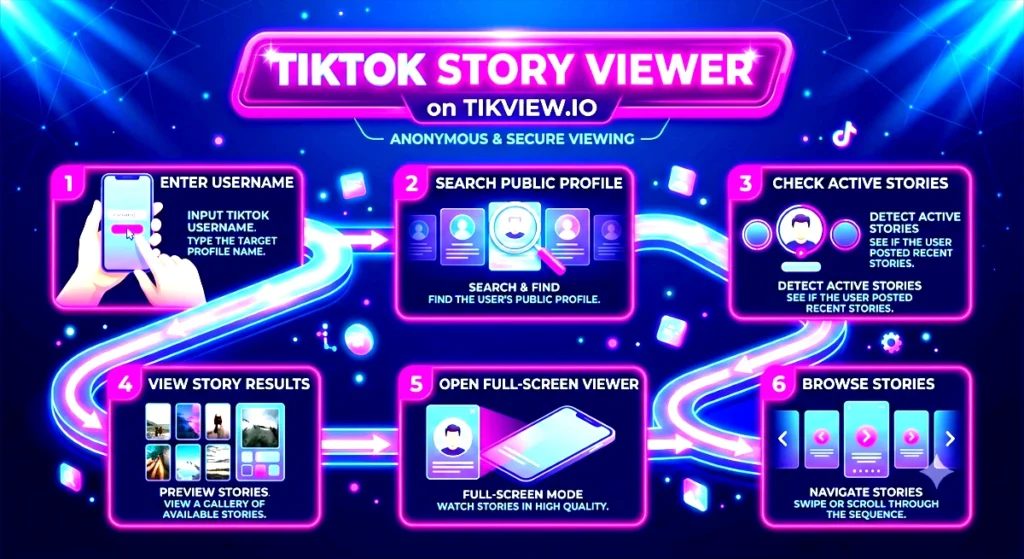
What You’ll See After Searching with:
- Story Thumbnails
- Story Count
- Creator Profile
- Story Timestamp
- Full-screen Viewer
- Playback Controls
When you enter a TikTok username into our Story Viewer, the tool sends a request to check whether that account currently has a public Story active. If the account is public and a Story is live, the relevant Story data is pulled and displayed right in your browser window.
If the account is private, or if there’s simply no active Story at that moment, the tool will let you know instead of returning broken or empty results. We built it this way on purpose: the goal is to give you a clean, accurate view of what’s publicly shared, not to dig up anything that isn’t already visible to the public.
Our Testing Experience
During testing, we found that most TikTok Stories appear within a few seconds after entering a valid username. If no Story is available for that account, TikTok Story Viewer displays a clear “No active Stories found” message. This helps users quickly understand whether the account has an active public Story without any confusion.
How to Use TikTok Story Viewer?
Getting started with TikView takes less than a minute. No registration, no hassle. Just follow these four simple steps to start viewing TikTok Stories right away.
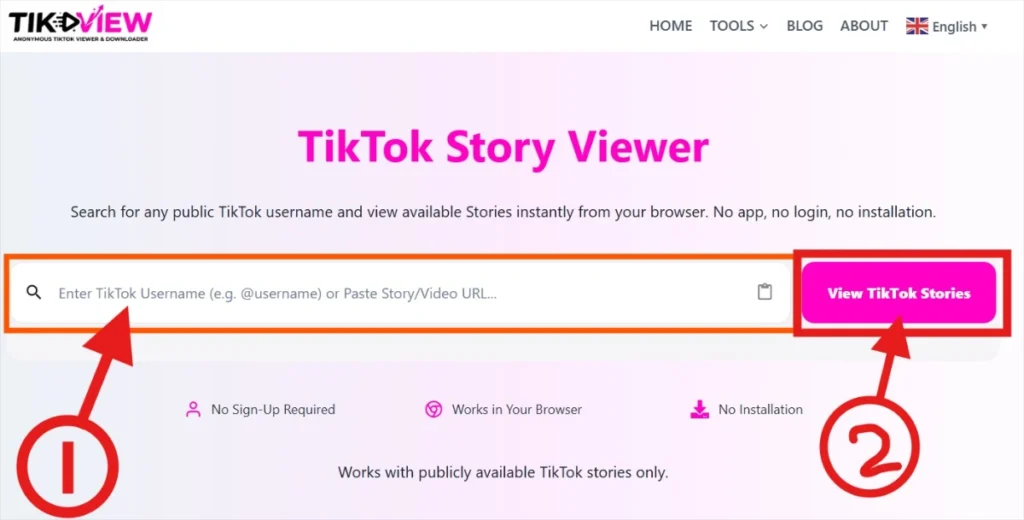
Step 1: Enter a TikTok username
Type in the username of the public TikTok account whose Stories you want to check. Make sure the spelling is correct so the tool can find the right profile. Once the username is entered, click the View TikTok Stories button to kick off the search. This tells the tool to start looking for that account’s Stories.
Step 2: Wait for Results
Give the tool a few seconds to search for any Stories tied to that username. Most searches finish quickly, so you won’t be waiting long. If the account has active Stories up, they’ll show up on your screen ready to view. If the account is private or has no active Stories at the moment, you’ll get a simple message letting you know instead of an error or a dead end.
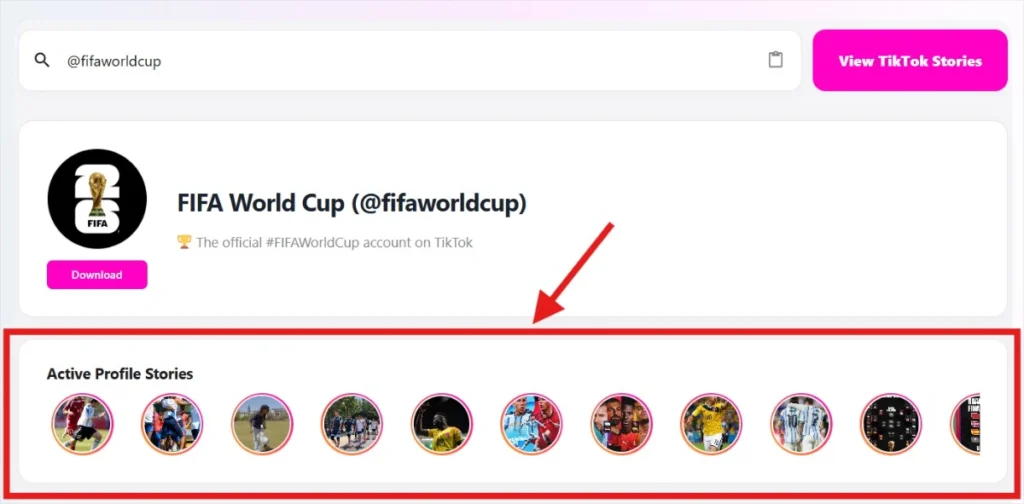
Step 3: View Available Stories
Click the Story thumbnail to view it, just like you would inside the TikTok app.
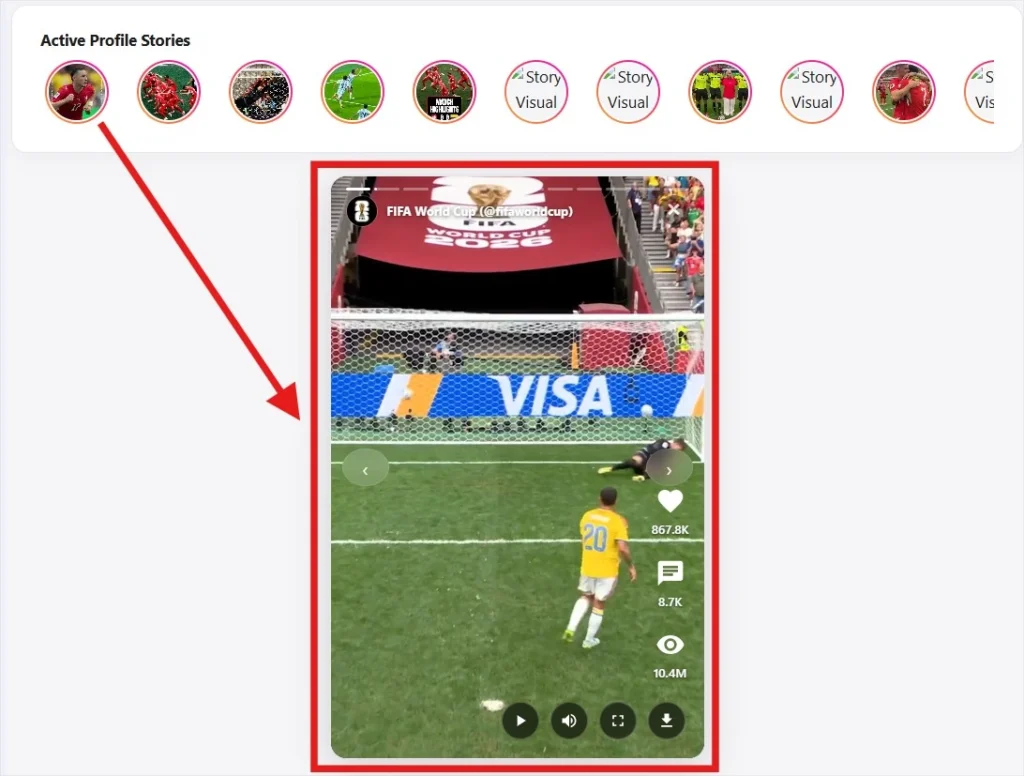
TikTok Story Viewer: Core Features & Interface Breakdown
Easy Navigation and Slide Controls
A progress bar sits at the top of the screen, showing how many Stories an account has posted and how much time is left on each one. If you don’t want to wait for a slide to finish on its own, the left and right arrows let you jump straight to the next Story or go back to the previous one.

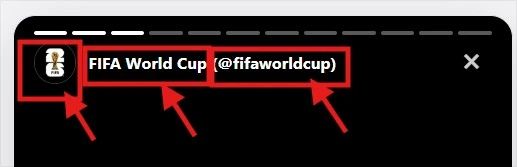
Creator Details at a Glance
Every Story shows the creator’s profile picture, display name, and TikTok handle, so you always know exactly whose content you’re watching. For example, you’d see something like FIFA World Cup (@fifaworldcup) displayed clearly above the Story itself.
Live Engagement Numbers
Right on the viewing screen, you’ll see the key numbers behind each Story:
- Likes, showing how many people reacted to it (for example, 300.6K)
- Comments, showing how much discussion it sparked (for example, 3.4K)
- Views, showing its overall reach (for example, 4.2M views)


Better Playback Options
Since this tool runs in a browser, it comes with playback controls you won’t normally get on mobile:
- Play and pause whenever you want to pause on a detail or keep watching
- Volume control, so you can mute or unmute with one click
- Full-screen mode, letting the video take up your whole screen for a more focused view
Built-In Privacy and Convenience Features
- No Account Required: Use the tool without connecting your own account, keeping your personal details separate and private.
Works on All Major Devices
Whether you’re at home, in the office, or on the move, TikView is designed to work across the devices people use every day.
| Device | Supported |
|---|---|
| Windows PC | ✅ |
| Mac | ✅ |
| Android Phone | ✅ |
| iPhone | ✅ |
| iPad | ✅ |
| Tablet | ✅ |
| Chromebook | ✅ |
Because everything runs in your browser, there’s no software installation or device-specific setup.
Supported Browsers
TikView is compatible with modern web browsers.
| Browser | Supported |
|---|---|
| Google Chrome | ✅ |
| Microsoft Edge | ✅ |
| Mozilla Firefox | ✅ |
| Safari | ✅ |
| Opera | ✅ |
Using the latest browser version generally provides the best experience.
Why View TikTok Stories in your browser?
We built TikView to solve a simple problem: checking a public TikTok story from a desktop browser takes too many steps. Instead of forcing you to download an app or create an account just to view already-public content, our tool gives you direct access.
People typically use this browser-based approach for a few specific reasons:
- Desktop Convenience: If you are already working on a PC or Mac, you can check a creator’s latest updates without breaking your workflow to switch devices.
- Total Anonymity: Because no login is required, your personal account details remain separate. You can view public stories without your name appearing on a creator’s viewer list.
- Brand & Competitor Tracking: Marketing teams use it to monitor influencer campaigns, flash sales, and competitor announcements cleanly from a desktop environment.
- No App Overhead: Skip the algorithm and the main feed. Just search the username, see what is live right now, and close the tab.
Key Benefits of the TikTok Story Viewer
| Benefit | Why It Matters |
|---|---|
| Fast Search | Quickly view public TikTok Stories in just a few seconds without unnecessary delays. |
| Easy to Use | A simple, intuitive interface that anyone can use, even without prior experience with online tools. |
| Fully Responsive | Works smoothly on smartphones and tablets, providing a seamless experience on any screen size. |
| Desktop Compatible | Optimized for Windows, Mac, and other desktop devices, making it easy to view Stories on a larger screen. |
| Public Content Only | It only pulls up Stories that users have made public, so TikTok’s privacy settings are never bypassed. |
| No Registration | Start using the tool instantly without creating an account or sharing any personal information. |
Why do people trust TikView’s Story Viewer?
We built this tool to be simple, honest, and easy to rely on, and that’s the standard we hold it to every day.
- Works on any device: Whether you’re on an iPhone, Android phone, tablet, or desktop, the tool loads the same way, right in your browser.
- Updated regularly: As TikTok changes how Stories work, we test and update this page so it keeps working the way it should.
- Tested before publishing: We don’t just write about the tool; we actually use it ourselves to confirm it does what it says.
- No data stored: We don’t save your search history or track what usernames you look up.
We know there are a lot of TikTok tools online that overpromise and underdeliver. Our goal with TikView is to be the opposite: a tool that’s straightforward about what it does, backed by a team that actually keeps it working, and honest about its limits when TikTok’s own platform changes.
Privacy & Safety
TikView is designed to respect TikTok’s privacy settings. The Story Viewer only works with content that is publicly available. It does not bypass account privacy, reveal hidden Stories, or provide access to private profiles.
We believe useful tools should also be responsible tools. That’s why TikView is built around transparency rather than unrealistic promises.
What the Tool Can Do
- Display publicly available TikTok Stories
- Search using a public TikTok username
- Work directly in your browser
- Support desktop and mobile devices
What the Tool Cannot Do
- View private TikTok Stories
- Access restricted accounts
- Bypass TikTok privacy settings
- Reveal deleted Stories
- Recover expired Stories
If a Story isn’t publicly available, TikView won’t display it.
TikView doesn’t require you to sign in with a TikTok account. It simply displays publicly available Stories and doesn’t bypass TikTok’s privacy settings.
Common Issues and How to Fix Them
Username Not Found:
Quick Answer: Check that you typed the TikTok username correctly. The tool isn’t case-sensitive, but a single typo can stop it from pulling up the right profile when you use our TikTok Story Viewer.
Things to check:
- Remove any extra spaces before or after the username
- Skip the “@” symbol unless the tool asks for it
- Confirm the account still exists on TikTok
- Make sure you’re searching the correct profile, not a similar one
No Stories Available:
Not every TikTok profile will have a live Story when you search.
This can happen for a few reasons:
- The creator hasn’t shared a Story recently
- The Story already expired (Stories only last 24 hours)
- The Story was taken down by the creator
- The account is set to private
- The Story isn’t set to public viewing
Private Account:
Our TikTok Story Viewer can only pull up content from public accounts. If a profile is private, the tool won’t be able to show its Stories. This isn’t a bug. It’s simply how the tool respects TikTok’s own privacy settings, so private users stay protected.
Stories Won’t Load:
If the page is stuck or nothing shows up, try these steps:
- Refresh the page
- Check that your internet connection is working
- Clear your browser’s cache
- Switch to a different browser and try again
- Turn off any browser extensions that might be interfering
Most of these loading problems clear up within a couple of minutes once you try one of the fixes above.
Browser Compatibility Problems:
If the tool looks broken or isn’t displaying properly, this usually comes down to your browser:
- Make sure your browser is updated to the latest version
- Turn on JavaScript if it’s disabled
- Use a supported browser like Chrome, Firefox, Edge, or Safari
- Close and reopen your browser
Tips for Getting Better Results
Follow these easy tips to get faster and more accurate results every time you use TikTok Story Viewer.
Use the Right Username:
To avoid mistakes, copy the username straight from the creator’s TikTok profile instead of typing it out by hand. Even a small typo can stop the TikTok Story Viewer tool from finding the right account.
Search While the Story Is Still Live:
TikTok Stories only last 24 hours. Once a Story expires or gets deleted, it will no longer show up when you search for it, so try to check it while it’s still active.
Make Sure the Account Is Public:
TikTok Story Viewer can only show Stories from public accounts. If someone has a private account, their Stories stay hidden, and no viewer tool can get around those privacy settings.
Keep Your Browser Up to Date:
Using an updated browser helps the tool run smoothly and load Stories faster, especially if you’re viewing them from a mobile phone.
Why You Can Trust TikView?
There’s no shortage of TikTok tools online. What’s harder to find is one that’s upfront about what it actually does and doesn’t.
At TikView, honesty comes first. Our TikTok Story Viewer only works with public TikTok content, and we’re clear about its limits instead of overselling what it can do.
We check the Story Viewer regularly to make sure it keeps working whenever TikTok changes something on its end. We also go back through this page from time to time to keep the steps, screenshots, and FAQs up to date.
Here’s what that looks like in practice:
- We check the tool after every major TikTok update.
- We make sure the guide still matches what users actually see.
- We update the FAQs whenever new questions come up.
- We tweak the interface based on what users tell us.
- We never say we can unlock private Stories or restricted content, because we can’t.
At the end of the day, we just want to offer a Story Viewer that works, is easy to use, and gives people honest information they can rely on.
How does TikView compare with other tools?
There are many TikTok Story Viewer websites online, but not all of them provide the same experience. Instead of making broad marketing claims, here’s what you can expect from TikView.
| Feature | TikView | Typical Tool |
|---|---|---|
| Mobile Responsive | ✅ | Varies |
| Desktop Friendly | ✅ | Limited |
| No Installation Required | ✅ | Usually |
| Login Required | ❌ | ✅ |
| Public Stories Only | ✅ | ✅ |
| Simple Interface | ✅ | Sometimes Cluttered |
| Helpful Documentation | ✅ | Limited |
| Regular Content Updates | ✅ | Inconsistent |
| Privacy-Focused Approach | ✅ | Often Unclear |
Rather than adding unnecessary features, TikView focuses on providing a clean, reliable experience for users who simply want to check publicly available TikTok Stories quickly.
You can also explore our other tools, including the TikTok Profile Viewer, TikTok Video Downloader, and TikTok Statistics, if you need additional TikTok insights.
Test Environment
Our team regularly tests TikView to make sure the TikTok Story Viewer works smoothly across popular browsers and devices. We review the search experience, Story loading, navigation, and overall performance to help ensure consistent results for public TikTok Stories.
Note: Results depend on the publically available TikTok Stories and your internet connection. Private accounts and expired Stories cannot be viewed.
| Environment | Details |
|---|---|
| Last Tested | October 2026 |
| Browsers Tested | Google Chrome, Safari, Mozilla Firefox, Microsoft Edge |
| Devices Tested | Windows, Mac, Android, iPhone |
| Tested By | TikView Editorial Team |
| Tool Type | Browser-based (No installation required) |
Frequently Asked Questions
Explore More TikView Tools
TikView offers additional tools to help you get more from TikTok.
| Tool | What It Helps You Do |
|---|---|
| TikTok Profile Viewer | View public profile information and account details. |
| TikTok Profile Picture Viewer | View and enlarge public TikTok profile photos. |
| TikTok Username Checker | Check username availability and formatting ideas. |
| TikTok Statistics | Learn about TikTok trends, engagement metrics, and platform insights. |
Ready to Try TikTok Story Viewer?
- View Public TikTok Stories in Seconds
- Checking TikTok Stories doesn’t have to be a hassle.
- Just type in a public TikTok username, click View Stories, and let TikView handle the rest.
- No confusing steps to follow.
- Just a quick, browser-based way to check TikTok Stories, right when you need to.