
TikTok Stats Viewer: View TikTok Account Analytics
View followers, likes, videos, engagement rate, posting activity, and other public TikTok profile statistics in seconds.
What You’ll Get
Every analysis produces a clean, easy-to-read stats dashboard built from the public information available on a TikTok profile. You’ll see who the creator is, how their audience is growing, and how their content is actually performing — without digging through TikTok’s app or spreadsheets.
The dashboard includes:
- Profile overview (photo, username, display name, bio, verification badge)
- Audience metrics (followers, following, total likes)
- Content output (video count, posting frequency, activity level)
- Performance metrics (average views, likes, comments, shares)
- Engagement rate, calculated from recent public activity
- Highlights (most-viewed video, latest video)
Everything shown comes from information the account has already made public. TikView doesn’t unlock, guess, or reveal anything the creator hasn’t already shared with the world.
Key Features
Instant Results
Get a complete overview of any public TikTok profile in seconds. There’s no waiting, no manual counting, and no need to switch between multiple pages.
Engagement Rate Calculated Automatically
Forget spreadsheets and manual calculations. TikView analyzes public interactions and calculates the engagement rate for you, making it easier to evaluate a profile’s performance.
Works on Any Device
Use the tool from any modern web browser on your desktop, tablet, or smartphone. There’s nothing to install, and no app is required.
Public Data Only
Every statistic comes from information that the profile owner has chosen to make public. TikView never accesses private accounts or hidden data.
No Login Required
Analyze any public TikTok profile without signing in, creating an account, or connecting your TikTok profile.
Built for Ongoing Analysis
Whether you’re monitoring competitors, reviewing potential influencers, or tracking your own public performance, you can use the tool whenever you need consistent and organized insights.
How It Works
- Enter a username or profile link: Paste a public TikTok handle or profile URL into the search bar.
- TikView reads the public profile: The tool retrieves only the data TikTok already displays publicly.
- Metrics are calculated: Engagement rate, averages, and activity level are computed from the public data.
- View your dashboard: Results appear in seconds, organized and ready to read or export.
How to Analyze Any TikTok Account in 3 Simple Steps Using Tikview.io?
1. Search Any Public TikTok Profile
Enter a public TikTok username into the search bar to instantly access detailed TikTok account analytics. No TikTok login, password, account connection, or OAuth authorization is required.
2. Click “View Analytics”
TikView automatically analyzes follower growth, engagement rate, video performance, audience demographics, content trends, and account statistics. Your complete TikTok analytics report is generated in seconds through a single, easy-to-read dashboard, as shown in the attached screenshot below.
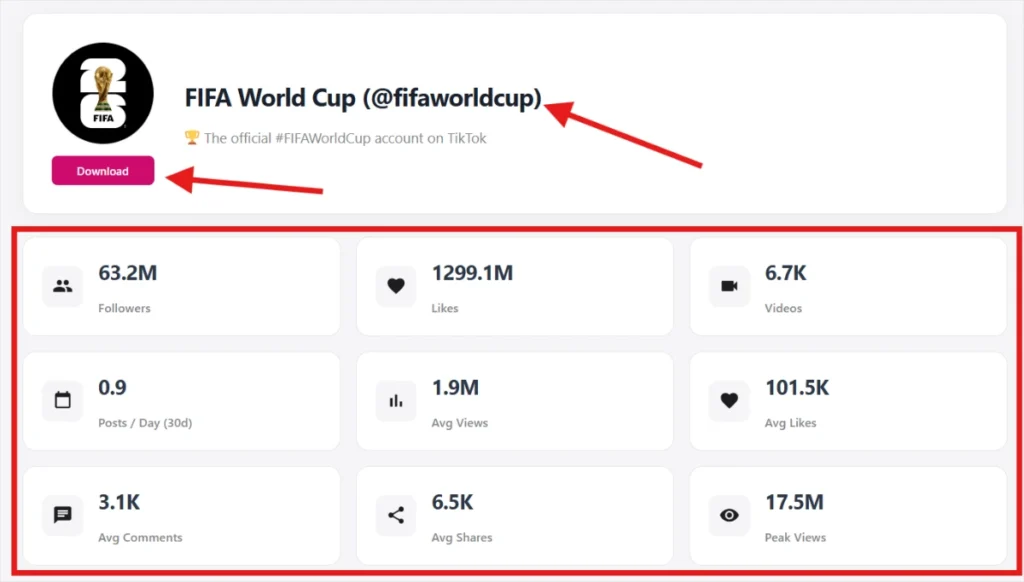
3. Export Reports or Track Growth
Download your TikTok analytics report as a CSV or PDF file for deeper analysis. You can also track any public TikTok account to monitor follower growth, engagement changes, viral content performance, and daily account activity with automated growth alerts.
Metrics Explained
| Metric | What It Means |
|---|---|
| Followers | The total number of people following the profile. This indicates the size of the account’s public audience. |
| Following | The number of accounts the profile follows. It can provide context about the creator’s activity and networking habits. |
| Total Likes | The combined number of likes received across all public videos published by the account. |
| Videos | The total number of publicly available videos on the profile. |
| Average Views | The average views across recent public videos. This helps estimate typical content reach. |
| Average Likes | The average likes received on recent videos, giving a quick view of audience appreciation. |
| Average Comments | The average number of comments on recent videos shows how actively viewers interact with the content. |
| Average Shares | The average shares on recent videos indicate how often viewers pass the content along to others. |
| Engagement Rate | A calculated percentage based on public interactions. It helps compare audience engagement between creators, regardless of follower count. |
| Posting Frequency | An estimate of how often the creator publishes new videos based on recent public activity. |
What Are TikTok Account Analytics or Stats?
TikTok account analytics are quantitative measurements of a profile’s performance, including follower growth rate, average watch time, engagement rate (likes, comments, and shares divided by views), and posting frequency. Native TikTok Studio shows this data only to the account owner for the last 60 days.
Why Use Tikview.io for TikTok Profile Analytics?
| Data Point | Native TikTok Studio | TikView Analytics |
|---|---|---|
| Competitor Tracking | Not available | Unlimited public profiles |
| Engagement Rate Calculator | Manual calculation only | Automatic |
| Trend Velocity | Not available | Real-time |