TikTok Viewer
Use TikView to explore public TikTok profiles, view available Stories, analyze creator statistics, and supported videos without logging in.
Everything You Need to Get More from TikTok
Look up any public TikTok profile in your browser.
See a creator’s bio, profile picture, username, and account status at a glance.
Browse public videos in a clean grid with view counts, so you can scan a creator’s content fast.
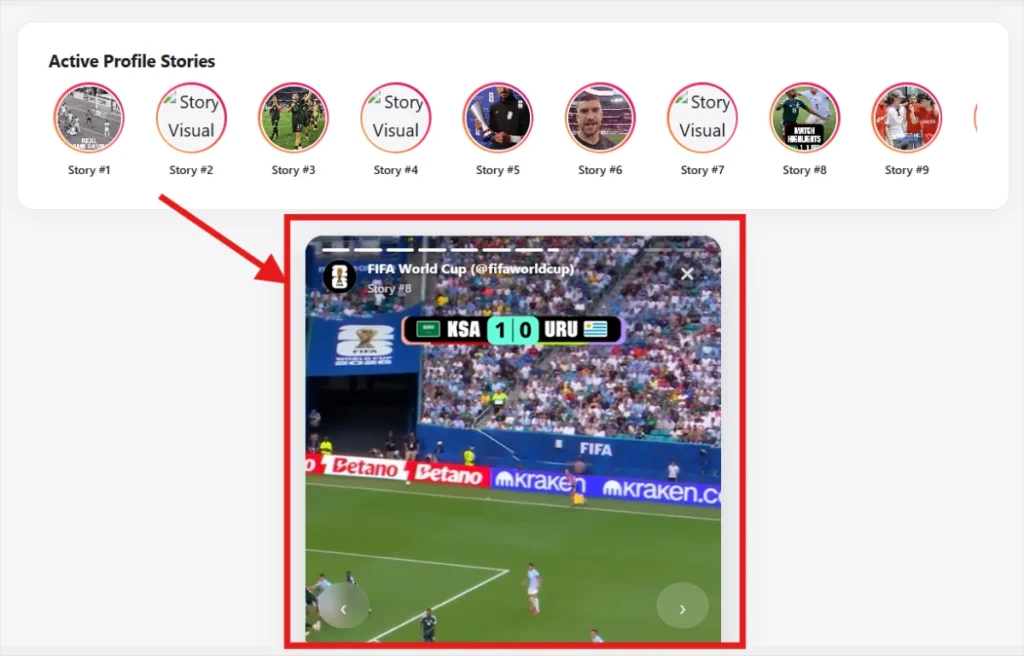
Check a public account’s currently active TikTok Stories from the browser.
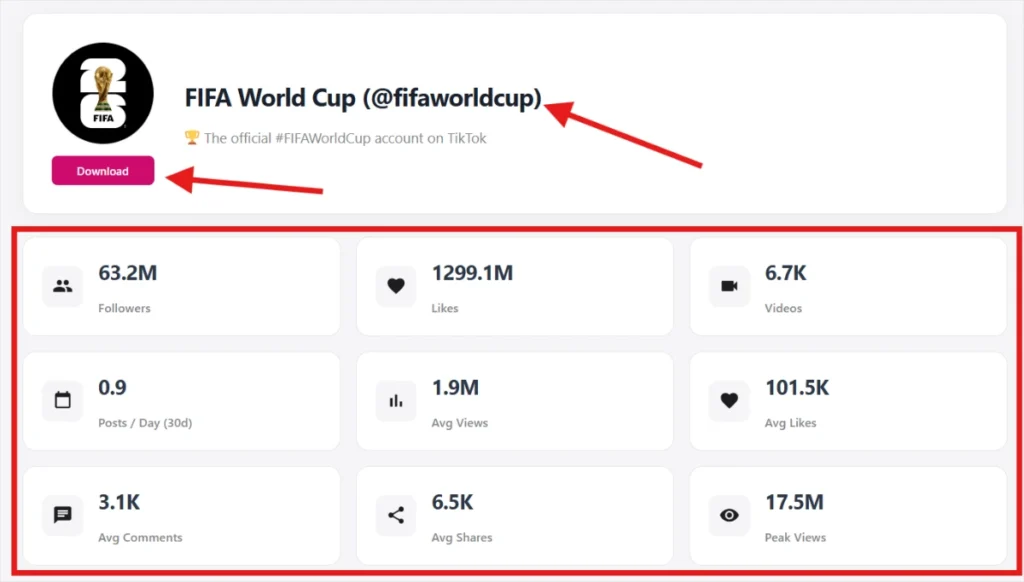
View publicly available follower and following counts, total likes, and other available profile statistics.
See what a public account has reposted, alongside their original uploads.
How to Use TikTok Viewer
Explore public TikTok content and creator profiles with TikView. Follow these 3 simple steps to get started, while respecting creators’ copyright and content usage rights.
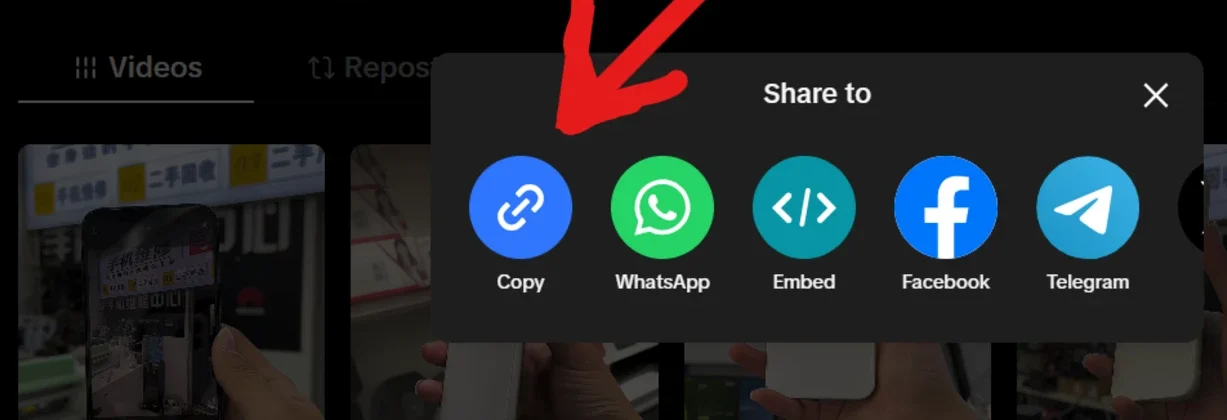
Step 1: Copy the User Name or URL from TikTok
- Open TikTok app, tap Share and select Copy Link.
- On a desktop browser, copy the URL from the address bar.
Step 2: Visit TikView.io
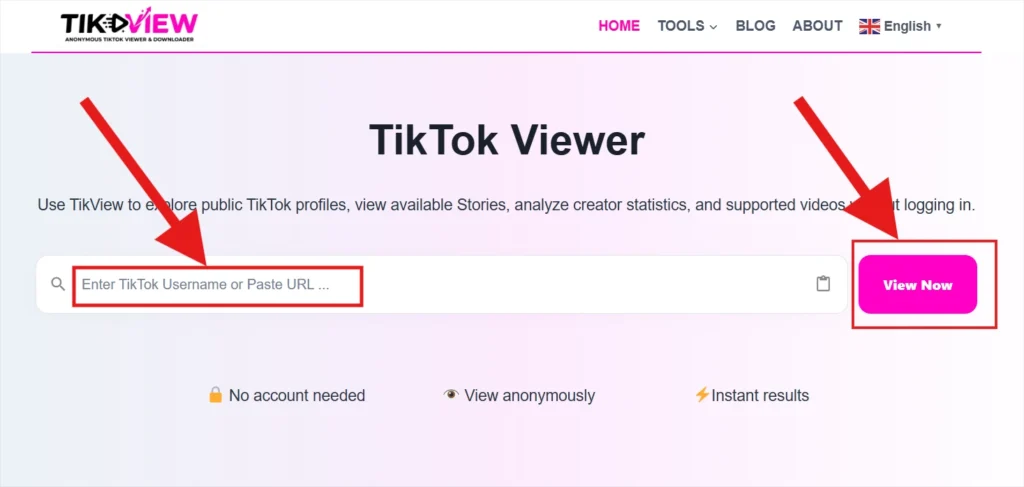
- Go to TikView.io and enter a TikTok username or paste a URL into the search box.
- Click the “View Now” button to start processing. TikView.io will fetch available public data instantly.
A browser tool for looking up what’s already public on TikTok
TikView is a simple online tool that lets you look up any public TikTok profile in seconds without login. Just type in a username and see their bio, follower count, following count, and total likes, plus their public videos and any stories that are currently live.
Public information only
TikView can’t and won’t show private accounts, or anything a user hasn’t made public.
Nothing to install
It runs entirely in your browser, on desktop or mobile.
Account Not required
Search as a guest, no sign-up wall on the core lookup.
Built for
What you can look up
Why TikView
Built around one rule: public data, shown honestly
No login
No TikView account required for supported tools.
Browser-based
Access TikView through a compatible web browser on your phone, tablet, or computer. You do not need to install a separate TikView application.
Public Profiles only
We never claim to access private accounts.
Simple Search and Navigation
Enter a supported TikTok username or profile URL to get started. Results depend on the selected tool, the availability of public content, and TikTok’s access restrictions.
Tools and Helpful Guides
Explore available TikTok viewing tools alongside practical guides covering profiles, videos, public stories where accessible, and account insights.
Understand the Available Data
Review the information returned by each tool, with explanations of estimated metrics and their limitations.
Practical Instructions
Use step-by-step guides to understand supported inputs, interpret results, and troubleshoot common issues.
We only show what’s already public
TikView doesn’t ask for a TikTok login, doesn’t store your search history against your identity, and never modifies the account you search. Everything shown is information the account owner has already made visible to any visitor.
What TikView can do
What TikView cannot do
TikTok Guides
Know Before You Post
You hit 1 million views. Now, how much did you actually earn?
A few hundred dollars from the platform itself. Whether that grows into something bigger depends on who watched your video and what you do with that attention.
The platform’s own payout
Most current estimates put TikTok’s Creator Rewards Program at $400 to $1,000 per million qualified views. Independent comparisons of creators who shared their real earnings produced a similar spread, with some results dipping just under $400 and a few topping $1,000. TikTok doesn’t publish a fixed rate, so no one can promise you an exact figure. Think of these numbers as a realistic range, not a price list.
Notice the word qualified. Your analytics may show a million views, but only a portion of them count toward your reward. Three things decide how much you take home:
- Video length. The program is built around longer content, and clips under about a minute generally don’t qualify.
- Viewer location. Advertisers spend more to reach people in the US, UK, and Western Europe, so views from those regions tend to earn more than views from lower-spend markets.
- Originality and engagement. Videos people actually watch through, save, and share earn more. Recycled or low-effort uploads often earn nothing.
For perspective, TikTok’s older Creator Fund paid only cents per thousand views. The current program pays far better, but it’s still modest next to what a creator can earn elsewhere.
What Actually Raises TikTok RPM and Engagement
Most TikTok growth advice treats views as the goal. If you want to get paid, that’s only half the picture. Engagement decides whether TikTok keeps pushing your videos out, and RPM (rewards per 1,000 qualified views) decides what each counted view pays. You need to work on both.
First, check that you’re eligible
Plenty of creators optimize for a payout they can’t receive yet. The Creator Rewards Program currently asks for:
- Age 18 or older, with a personal account
- At least 10,000 followers
- At least 100,000 video views in the last 30 days
- Residence in a country where the program is available
Even then, it only pays on original videos longer than one minute, and a video needs at least 1,000 qualified views before it earns anything. The country list changes, so check inside the app under Creator tools.
Know the difference between views and qualified views
The number on your video isn’t the number you get paid on. Bots, paid views, and views from people who scroll straight past are filtered out. One 2026 analysis found that a video showing 500,000 total views can show only 250,000 to 350,000 qualified views in the rewards dashboard. Buying views is worse than useless, because it can get you disqualified from the program.
So the real goal is attention that’s actually real: people who watch, not people who happen to be counted.
What TikTok says it rewards
TikTok doesn’t publish its RPM formula, but it does name four factors: originality, play duration, search value, and audience engagement. Everything below ties back to one of them.
1. Open with the payoff, not the intro.
Viewers decide in seconds. Lead with the result, the surprising claim, or the question you are about to answer. Skip the logo animation and the “hey guys, so today…” warm-up.
2. Make it worth finishing.
Because the program favors longer videos, holding people for a full minute or more matters. Tease something early and deliver it late (“mistake number three is the expensive one”). Cut the pauses and filler, and watch where the retention graph drops in TikTok Analytics. That dip tells you exactly where you lost people.
3. Make things people search for.
Tutorials, comparisons, and explainers answer questions people type into TikTok’s search bar. They keep earning long after a trend dies, and they speak directly to the “search value” factor.
4. Ask for a specific reply.
“Which would you choose, A or B?” tends to pull more comments than “let me know what you think.” Reply to those comments, and turn the best ones into your next video.
5. Be original.
Reposts, stitched-together compilations, and low-effort content are the fastest way to earn nothing. Add your own angle, voice, or experience.
6. Choose hashtags and sounds that fit.
A trending sound can bring a crowd that has no interest in your topic. They leave within seconds, which drags down your watch time. Fewer, better-matched viewers beat a bigger, mismatched audience.
Raise the value of each view
Advertisers pay more to reach people who spend. Reported rates are highest for finance, tech, business, and insurance content, and views from the US, UK, and Western Europe generally earn more than views from lower ad-spend markets. You don’t need to abandon your interests. But there’s a big difference between a video about a hobby and a video about how to afford the hobby, and the second one speaks to a more commercial audience.
Don’t build your income on a number you can’t see
Two creators with the same qualified views can be paid differently, and TikTok can change its rules whenever it wants. Reported earnings currently sit around $400 to $1,000 per million qualified views, which is real money but rarely a full income. Affiliate links, brand deals, your own products, and an email list or website all give you income you control, and they grow from the same trust that drives engagement.
A simple weekly routine
Pull your last 10 videos and compare average watch time, completion rate, shares, and viewer location.
- Find the hooks and topics that held people longest, and the moment most of them left.
- Change one thing in the next video, such as the hook, the length, or the topic, so you know what caused the result.
- Repeat. Small, steady tests beat dramatic overhauls.
The takeaway
Higher RPM and stronger engagement come from the same place: a clear niche, original videos, and an audience that actually watches. Treat TikTok’s payout as one income stream among several, and let your analytics, not guesswork, decide what to fix next.
How Influencers Calculate Sponsorship Prices: A Research-Backed Breakdown
Influencer pricing looks like guesswork from the outside, but when you study how working creators and agencies quote deals, a pattern emerges. A sponsorship rate is an estimate of the return a brand can expect, built from five inputs: reach, engagement, audience value, content effort, and rights. Call it the Value Stack.
Note: the figures below are commonly cited industry benchmarks, not fixed rules. Rates shift by platform, region, and year, so treat them as starting points to validate against current data.
Layer 1: Reach, Priced Through CPM
Most pricing conversations begin with CPM (cost per mille), the fee for every 1,000 impressions. The formula is simple:
Rate = (Average views ÷ 1,000) × CPM
A creator averaging 40,000 views per video at a $25 CPM would quote about $1,000. Typical CPM ranges differ by format:
| Format | Commonly cited CPM range |
|---|---|
| Short-form video (Reels, TikTok, Shorts) | Lower end, roughly $5 to $20 |
| Static posts and stories | Roughly $5 to $15 |
| YouTube long-form integrations | Roughly $15 to $50+ |
| Podcast host-read ads | Roughly $18 to $50+ |
Long-form and audio formats price higher because attention is sustained and the endorsement feels more personal. One caution: price against average views, not follower count. Followers are a vanity metric, while views show who actually shows up.
Layer 2: Engagement, the Trust Multiplier
Research on influencer marketing has repeatedly shown that smaller creators often post higher engagement rates than mega-accounts. That’s why brands increasingly favor micro-influencers (roughly 10K to 100K followers) for conversion-driven campaigns.
Brands typically audit:
- Engagement rate (comments, shares, and saves weighted above likes)
- Average watch time and retention
- Comment quality, meaning real conversation versus generic emojis
- Past click-through and conversion data
- Follower authenticity, since bot-inflated audiences destroy credibility fast
A creator whose engagement beats their niche average can justify charging above standard CPM. Engagement is a proxy for trust, and trust is what the sponsor is buying.
Layer 3: Niche Value and Buyer Intent
Two audiences of identical size can carry very different commercial value. The deciding factor is buyer intent and advertiser competition.
- Premium niches: finance, SaaS, B2B, tech, real estate, and health. Products are high-ticket, so one converted customer can repay the entire sponsorship.
- Mid-tier niches: fitness, beauty, education, and travel.
- Lower-yield niches: general entertainment and meme content. Reach is huge, but purchase intent is weak.
This explains why a 30,000-subscriber finance channel can out-earn a 300,000-follower comedy page.
Layer 4: Production Effort and Format
Price tracks the work involved and the persuasion depth:
- Story mention or tag: lowest tier
- Feed post or short video: mid tier
- Dedicated review, tutorial, or demo: high tier, since it requires scripting, filming, and editing
- Multi-platform bundle or ongoing series: top tier
Many creators also price by time invested, calculating an effective hourly rate to make sure a deal covers production, revisions, and communication.
Layer 5: Rights, Restrictions, and Add-Ons
This is where experienced creators protect their margins. The base fee covers the post. Everything else is billed separately:
- Usage rights: if the brand repurposes the content in ads, emails, or on its website. Often priced as a percentage uplift or by duration.
- Exclusivity: barring competitors for a defined window, which removes future income and so costs extra.
- Whitelisting / partnership ads: the brand runs paid promotion through the creator’s handle.
- Rush delivery and extra revision rounds
- Link-in-bio or pinned placement duration
Many creators find that these add-ons contribute a meaningful share of total deal value.
Proof Over Promises: Benchmarking With Data
Established creators don’t price by instinct. They maintain a record of past campaigns: which deliverables drove clicks, which brands renewed, and which formats underperformed. That history feeds a media kit containing:
- Audience demographics (age, location, gender split)
- Average reach and engagement by format
- Case studies with measurable outcomes
- Clear package pricing
When rates are challenged, data is the strongest negotiating tool a creator has.
Pricing for the Long Game
Single posts leave value on the table. Retainers and multi-post packages typically carry a per-deliverable discount, but they reward both sides: brands gain repeated exposure (consistent with the well-known principle that repetition builds recall), and creators gain predictable income.
Key Takeaway
Sponsorship pricing isn’t about follower count. It’s the combined value of reach × engagement × niche demand × effort × rights, supported by evidence. Creators who track their analytics, understand their niche premium, and charge separately for usage and exclusivity consistently command higher, more sustainable rates.
How to Analyze your Competitors on TikTok Without Copying a Single Frame
Most creators treat competitor research like window shopping: a quick scroll, a few “oh, that’s clever” moments, then back to guessing. Real analysis is closer to detective work. You’re not hunting for something to imitate. You’re hunting for patterns that explain why one video explodes while another quietly dies.
Here’s the framework I’d use.
1. Build Your Competitor Map First
Before you analyze anything, decide who deserves your attention. Sort accounts into three groups:
- Direct competitors: Same niche, same audience, same offer.
- Adjacent creators: Different topic, same viewers (a fitness coach and a meal-prep creator, for example).
- Rising stars: Accounts under 50K followers that are growing fast. They’re often the most revealing, because their wins come from smart content rather than an established fanbase.
Aim for 8 to 10 accounts. Fewer gives you a thin sample, and more turns into noise.
2. Study the Videos That Broke the Pattern
Don’t judge an account by its latest post. Open the Popular tab and review their top 5 to 10 videos, then ask:
- What’s the hook? What happens in the first two seconds to stop the scroll?
- What’s the format? Talking head, tutorial, storytelling, trend remix, POV, screen recording?
- How long is it? Do their winners run 12 seconds or 45?
- What does the caption do? Does it add context, spark debate, or ask a question?
- What’s the share-to-like ratio? TikTok doesn’t publish how it weighs each interaction, but shares are generally considered a strong sign that a video was useful or relatable enough to pass along.
3. Decode Hashtags and Sounds
Hashtags and audio are part of TikTok’s discovery layer, so treat them as data.
Hashtags: Note which tags keep showing up in a competitor’s best posts. Sort them into broad tags (#smallbusiness), niche tags (#etsysellertips), and branded tags. Many creators find that mixing broad and niche tags works better than stacking generic ones, but test it on your own account rather than taking that as a rule.
Sounds: Check whether top posts use trending audio, original audio, or voiceovers. Trending sounds can help early reach, while original audio builds recognition. Accounts that use both deliberately tend to look more balanced.
Use TikTok Creative Center. It’s free and shows trending hashtags, sounds, and top-performing content by region and industry. It’s a great way to confirm whether a pattern you spotted is a competitor habit or a wider trend.
The goal isn’t to copy anyone’s tags. It’s to find gaps: topics or sounds your competitors haven’t used that your audience clearly cares about.
4. Judge Engagement Rate, Not Follower Count
A million followers means little if hardly anyone reacts. To compare accounts fairly, calculate engagement rate by views:
Engagement rate = (likes + comments + shares + saves) ÷ views × 100
We use views rather than followers because they show how people responded to the people who actually watched. Here’s an illustration (not a benchmark): a creator with 20K followers and a 9% engagement rate may be doing something smarter than an account with 500K followers and a 1% rate.
Also watch velocity, meaning how quickly a video gains traction in the first hour or two. Fast early momentum often suggests the hook and topic fit the audience well. You can estimate it by checking a post shortly after it goes live and again a few hours later.
5. Mine the Comment Section
Comments are free market research. Skim the top comments on competitor videos and sort them into four buckets:
- Praise: What do viewers love? Do more of that, in your own voice.
- Complaints: What annoys them? That’s your opening.
- Questions: Every repeated question is a ready-made video idea.
- Requests: “Can you do a part 2?” or “Show us how to…” tells you what the audience wants next.
If the same comment appears across five different videos, you’ve found real demand.
6. Check Posting Rhythm and Consistency
Look at how often and when competitors post. Is it daily, a few times a week, or in bursts? Do they run series (Part 1, Part 2, Part 3) that bring viewers back? Their rhythm shows what their audience has come to expect, and where you could stand out by offering something different.
7. Turn Insights Into Action
Research only matters if it changes what you publish. Try this loop:
- Collect observations for one week.
- Pick three ideas inspired by what you found.
- Test them with your own twist on the hook, format, or angle.
- Compare the results to your usual numbers.
- Repeat, keeping what works and dropping what doesn’t.
The Bottom Line
Competitor analysis on TikTok isn’t about chasing what others are doing. It’s about understanding why certain content works, then using that knowledge to make something only you could make. Study the patterns, listen to the audience, and let data replace guesswork. The creators who grow steadily aren’t luckier. They’re just better informed.
Frequently Asked Questions
Have questions about using our TikTok Viewer? Below you’ll find answers to the most common questions about viewing public TikTok profiles, Stories, videos, profile analytics, and other available features. Learn how the tool works, what information it can display, and how to use it safely and efficiently.