
To create a TikTok account, download the TikTok app or visit TikTok.com, tap Sign Up, choose a sign-up method (email, phone number, Google, Apple, or Facebook), verify your account, create a password, and choose a username. The entire process usually takes less than five minutes.
Creating a TikTok account only takes a few minutes, but many people still run into problems with verification, choosing a sign-up method, or entering the correct information. After seeing these questions come up repeatedly, we put together this step-by-step guide to walk you through the entire process and help you avoid the most common mistakes.
At TikView, we regularly test TikTok features and update our guides whenever the app changes. This guide reflects the current sign-up process and includes fixes for the most common issues new users face.

Before starting, make sure you have the TikTok app installed from the Google Play Store or the App Store. If you’re using a computer, you can also create an account on TikTok’s website.
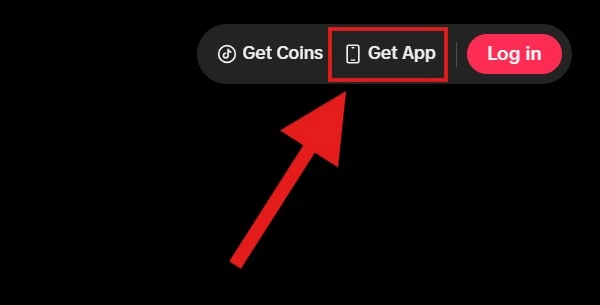
The process is simple. Open TikTok, tap Sign Up, then choose whether to register with your phone number, email address, or an existing account like Google or Facebook. Then enter your date of birth, complete the verification step, and create your username and password.
If everything is entered correctly, your new TikTok account should be ready in just a few minutes. In the step-by-step guide below, I’ll also point out the common mistakes that prevent people from signing up successfully, so you can avoid them from the start.
Why You Need a TikTok Account
You can technically browse TikTok’s “For You” feed without signing in, but a free account is what unlocks the platform’s real value. After signing up, you can like and save videos, follow creators, comment on posts, send messages, upload your own content, and create a profile that showcases your interests or personal brand. If you’re planning to grow a following, sell products through TikTok Shop, or keep a private space to save videos for later, creating an account is the first and most essential step.
What You’ll Need Before You Start
Before you begin, have one of the following ready:
- A valid email address, or
- An active phone number that can receive SMS codes, or
- An existing Google, Facebook, or Apple ID you’re comfortable linking
You’ll also need to know your date of birth, since TikTok requires all users to meet a minimum age requirement (usually 13, though this can vary slightly by country) before an account can be created.
| Sign up with | Best for |
|---|---|
| Business users | |
| Phone | Faster verification |
| Quick login | |
| Apple | iPhone users |
| Existing Facebook users |
Step-by-Step Guide: Creating a TikTok Account on Your Phone
This is the most common way to create an account on TikTok on a phone, whether you’re using an iPhone or an Android device. The process is almost the same on both platforms.
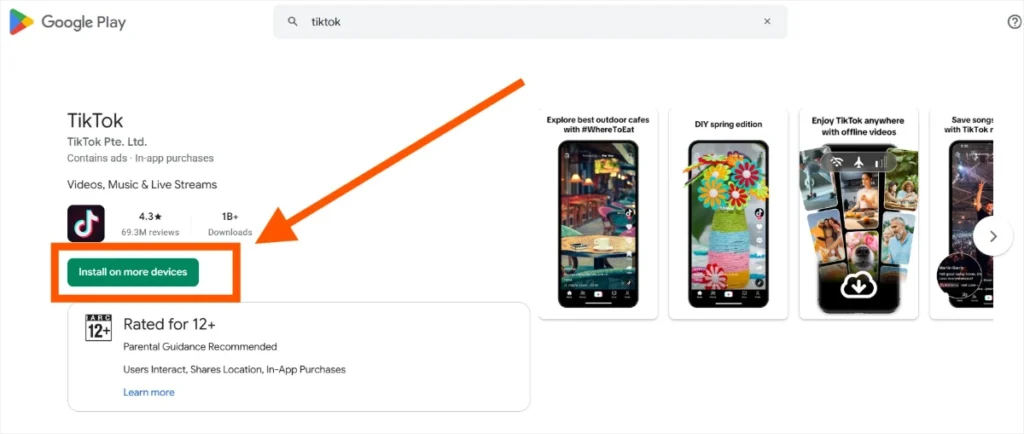
Step 1: Download the App.
Open the App Store (iPhone) or Google Play Store (Android), search for “TikTok,” and tap Install. Once the download is complete, open the app.
Step 2: Tap the “Login” Button
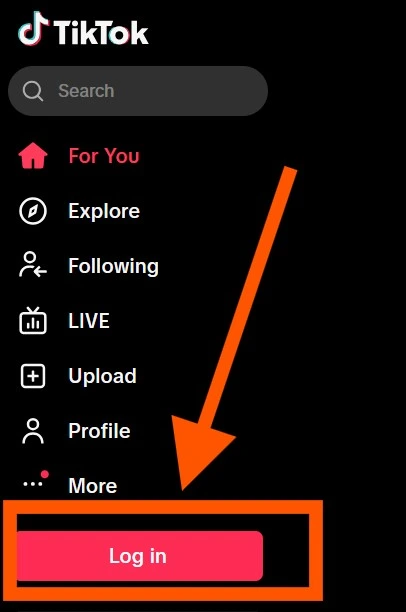
On the welcome screen, tap the Login button at the bottom.
Step 3: Choose a Sign-Up Method.
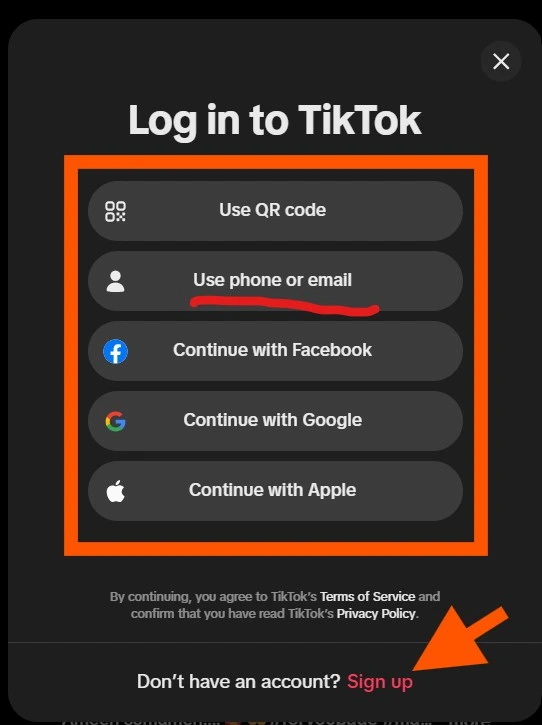
You’ll see several options: Phone or email, Facebook, Google, or Apple. Choose whichever is easiest for you. Most beginners pick “Phone or email” since it doesn’t require linking another account.
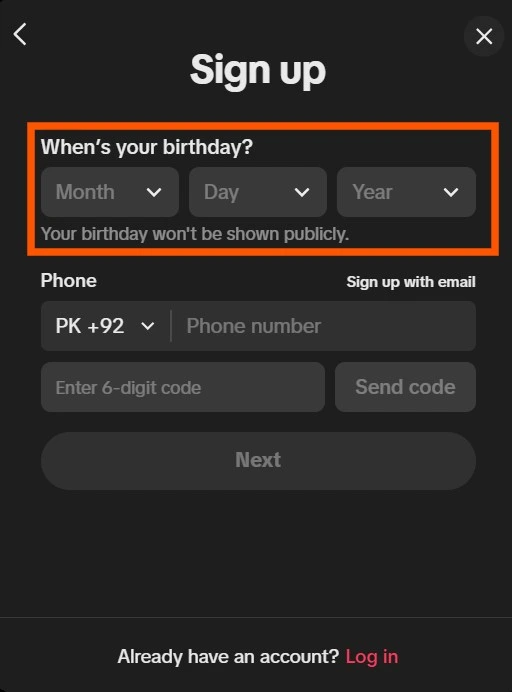
Step 4: Enter Your Birthday.
TikTok will ask for your date of birth before anything else. Enter it accurately, since this determines what safety and content settings apply to your account, and it generally can’t be changed later without going through account recovery steps.
Step 5: Enter Your Phone Number or Email.
If you choose “Phone or email,” select which one you’d like to use, then type it in and tap Send Code.
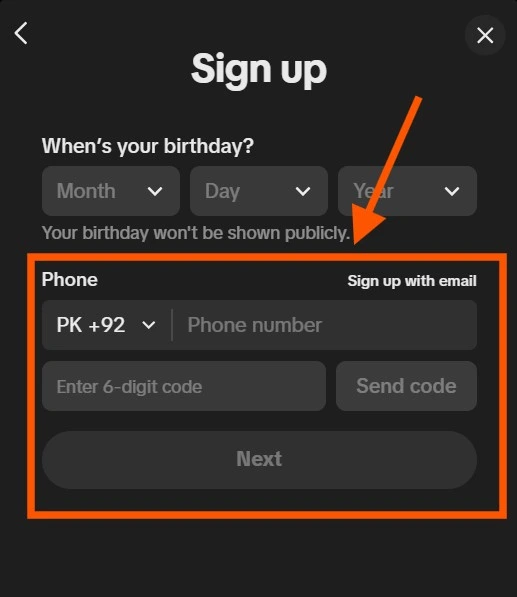
Step 6: Verify with the code.
TikTok will send a short verification code by SMS or email. Enter that code in the app to confirm it’s really you.
Step 7: Create a password.
Choose a strong password with a mix of letters, numbers, and symbols. Avoid using the same password you use for other accounts.
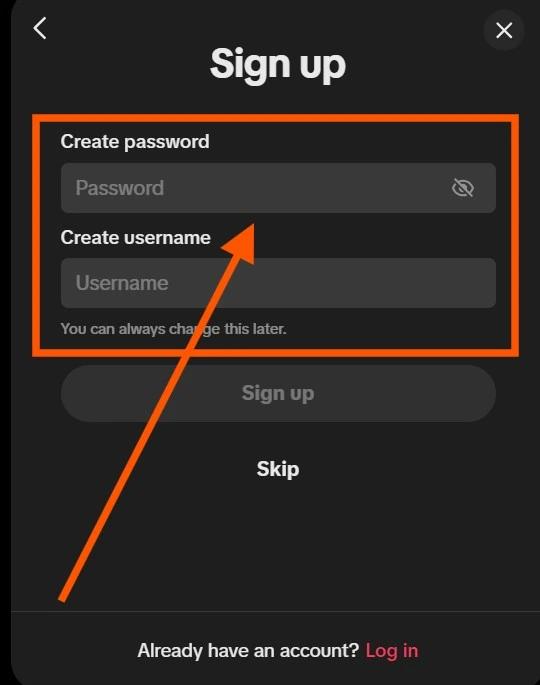
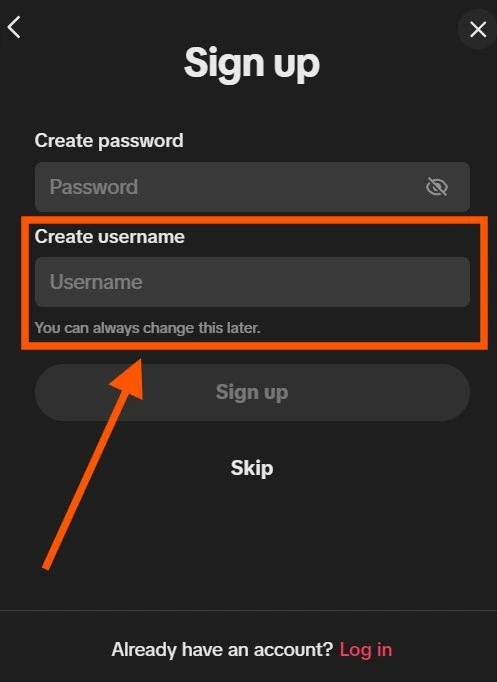
Step 8: Choose a Username.
Pick a username that represents you or your brand. You can change this later in your profile settings, so don’t worry too much about getting it perfect on the first try. If you aren’t happy with your first choice, you can always change your TikTok username later.
Step 9: Set Up Your Profile.
Add a profile photo, a short bio, and any social links if you’d like. This step is optional, so you can skip it if you prefer.
Step 10: Start exploring.
Your account is now ready to use. TikTok will usually walk you through a short interest selection screen so it can start personalizing your For You feed right away.
Step-by-Step Guide: Creating a TikTok Account on a Computer
If you’d rather sign up in a web browser rather than the mobile app, the process is just as simple.
- Go to tiktok.com in your browser.
- Click Sign up in the top-right corner.
- Choose to sign up with your phone number, email, or a linked account (Google, Facebook, Apple, or Twitter/X).
- Enter your birthday.
- Fill in the requested verification details and confirm the code sent to you.
- Create a password and username.
- Click Sign up to finish.
Signing up on desktop is especially useful if you’re planning to manage TikTok Shop, TikTok Ads Manager, or a Creator Account, since some business tools are easier to set up from a browser.
Signing Up With Email vs. Phone Number
Both methods work equally well, and TikTok treats them the same once your account is created. Here’s how to decide which one to use:
- A phone number is faster if you want quick SMS verification and easier account recovery through text messages.
- Email is a better choice if you don’t want to share your phone number or if you’re creating a TikTok account for a business where a dedicated business email makes more sense.
You can add the other option later from your account settings, so signing up with just one doesn’t lock you out of the other.
How to Create a TikTok Account Without a Phone Number
You don’t need a phone number to join TikTok. During sign-up, simply choose the email option instead of phone, and follow the same verification steps using a code sent to your inbox. This is the easiest way to create an account if you don’t want to share your mobile number, or if you’re signing up from a device that doesn’t support SMS verification, such as a tablet without a SIM card or a desktop computer.
Creating a TikTok Business Account
If you’re signing up to promote a brand rather than a personal profile, start by creating a normal account first using the steps above, then switch it to a Business Account from your settings:
- Go to your Profile and tap the three-line menu in the top corner.
- Tap Settings and Privacy.
- Select Manage Account.
- Tap Switch to Business Account.
- Select the category that best fits your business.
- Add your business email and complete the on-screen prompts.
A Business Account unlocks analytics, promotional tools, and access to TikTok Ads Manager, which aren’t available on standard personal accounts.
Making a Second TikTok Account
Want to run more than one account, maybe one personal and one for a project or business? TikTok allows up to five accounts on a single device.
- Open your Profile and tap your username at the top.
- Select Add Account.
- Choose to sign up with a new phone number, email, or linked account.
- Complete the same verification and profile setup steps outlined above.
Once added, you can switch between accounts instantly from the same menu without logging out.
Pro Tips for New Accounts
- Use a username that’s easy to search and consistent with your other social profiles.
- Turn on two-factor authentication early to protect your account from being hijacked.
- Fill out your bio and profile photo right away; complete profiles tend to get more trust and followers.
- Spend a few minutes exploring your interests and completing your profile before posting your first video.
Common Mistakes to Avoid
- Entering the wrong birthday — this can restrict features and is difficult to fix later.
- Using a weak or reused password — this is one of the most common causes of account hacks.
- Skipping email/phone verification — an unverified account is harder to recover if you ever get locked out.
- Creating multiple accounts with the same details may be flagged by TikTok as suspicious activity.
Can’t Create a TikTok Account? Here’s How to Fix It
Signing up for TikTok is usually quick, but now and then, something goes wrong, and you’re stuck staring at an error message instead of scrolling your feed. The good news is that almost every sign-up problem comes down to a handful of common causes, and most of them you can fix yourself in a few minutes. Here’s what to do for each one.
Verification Code Not Arriving
This is the most common hiccup, and it’s rarely TikTok’s fault. Start with the basics:
- Double-check you typed your phone number or email correctly, including the country code.
- Wait a couple of minutes. Codes can take longer to arrive during peak hours.
- Check your spam or junk folder if you’re signing up with email.
- Make sure your phone has signal and isn’t in airplane mode, and that you’re not blocking SMS from unknown senders.
- If you’ve requested several codes in a row, wait at least 15–20 minutes before trying again. Requesting too many too fast can temporarily block new ones from sending.
If none of that works, try switching sign-up methods entirely (phone instead of email, or vice versa) rather than repeatedly retrying the same one.
Birthday Error
TikTok checks your birthday against its minimum age requirement, and once you submit it, you usually can’t change it later. If you’re getting an error:
- Make sure you’re entering your real, correct birthdate — not a placeholder or a typo.
- Confirm you meet the minimum age for your region (13+ in most countries, though this varies).
- Avoid entering a date that makes you appear younger than you actually are, even by accident, since this can flag or restrict the account.
If you already entered the wrong birthday on an existing account, you’ll typically need to contact TikTok support directly, since self-service date-of-birth changes are limited.
“Phone Number Already Used”
This means the number is tied to another TikTok account, even one you forgot about.
- Try logging in instead of signing up, using that phone number.
- Use TikTok’s account recovery option to find out what account is linked to it.
- If it’s genuinely not your account (a recycled number from a previous owner, for example), you may need to use a different number or go through TikTok’s support process to dispute it.
Too Many Attempts
TikTok temporarily locks sign-up attempts after repeated failed tries, mainly to prevent bots and spam accounts. If you see this message:
- Stop trying immediately. Repeated attempts usually extend the lockout instead of resolving it.
- Wait at least an hour, though some lockouts last up to 24 hours.
- In the meantime, avoid switching between multiple phone numbers or emails on the same device, as that can look suspicious to TikTok’s system and prolong the block.
Email Already Registered
Similar to the phone number issue, this simply means an account already exists with that email.
- Try the “forgot password” option to regain access if it’s your old account.
- Check other email addresses you commonly use; you may have signed up years ago and forgotten.
- If the email isn’t yours (for instance, a shared work or family email), use a different one to create your new account.
Region Restrictions
TikTok’s availability and features vary by country, and some regions have partial or full restrictions.
- Confirm TikTok is officially available in your country. In places where it’s banned or limited, sign-up may fail entirely or only partially work.
- If you’re traveling, your current location might not match your home region’s settings, causing conflicts.
- Using a VPN can sometimes cause more sign-up errors than it solves, since TikTok may flag the mismatched location. If you’re using one, try turning it off and signing up from your actual location.
Network Error
Sometimes the problem isn’t your account at all — it’s your connection.
- Switch between Wi-Fi and mobile data to see if the issue persists.
- Restart the app completely, or reinstall it if it’s been a while since you updated.
- Check whether TikTok is experiencing a wider outage; if their servers are down, no amount of troubleshooting on your end will help.
- Clear the app’s cache (on Android: Settings > Apps > TikTok > Storage > Clear Cache) and try again.
Still stuck? If you’ve tried the fixes above and nothing works, your best bet is TikTok’s in-app support: go to Profile > Menu > Settings and Privacy > Report a Problem. It routes you to solutions specific to your account and device, and it’s the fastest way to reach a real fix when a generic troubleshooting guide isn’t cutting it.
Frequently Asked Questions
Your TikTok account is now ready. Before posting your first video, take a few minutes to complete your profile, enable two-factor authentication, and explore your interests so your For You feed becomes more relevant. If you’re new to the platform.
Next Steps
- Learn how the TikTok algorithm works
- Watch TikTok without an account
- Change your TikTok username
- Make your TikTok account private