
Why I Wrote This Guide
Last month, a follower named Ayesha messaged me in a panic. A stranger kept commenting rude things on her videos. When she ignored him, he started sending her messages every day. She had never blocked anyone before and couldn’t find the button. She was embarrassed and stressed, and she almost deleted her account.
I walked her through it, and it took less than one minute. She told me, “I wish someone had explained this in simple words.” So I wrote this guide for her and for anyone else who needs it.
You don’t have to put up with rude, annoying, or unsafe people on TikTok. Blocking is your right.
What Happens When You Block Someone?
Once you block a person on TikTok:
- They can’t see your profile or your videos.
- They can’t comment on your videos.
- They can’t send you messages.
- They can’t follow you, and any existing follow is removed.
- They are not notified that you blocked them. They will only notice if they search for your profile and can’t find it.
Step-by-Step: How to Block Someone
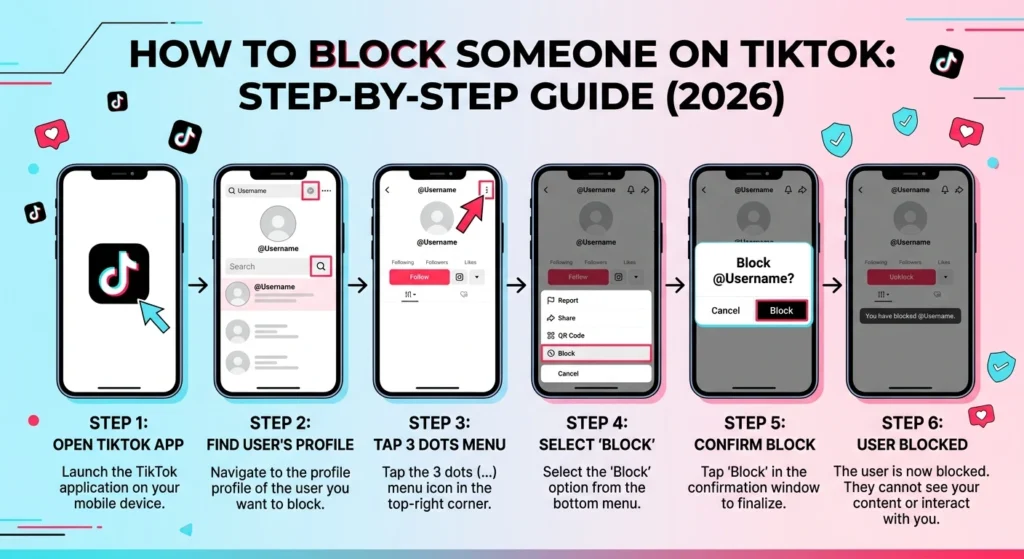
Method 1: From Their Profile (Easiest)
- Open the TikTok app.
- Search for the person’s username, or tap their name on a video or comment.
- You are now on their profile page.
- Tap the three dots (⋯) or the share icon at the top right corner.
- Tap Block.
- A message will ask you to confirm. Tap Block again.
Done. That person is now blocked.
Method 2: From Your Messages (Inbox)
Use this if someone is sending you unwanted messages.
- Tap Inbox at the bottom of the screen.
- Open the chat with the person.
- Tap the three dots or the profile icon at the top right of the chat.
- Tap Block and confirm.
Method 3: Through Comments
If someone is leaving bad comments, tap their profile picture next to the comment. This opens their profile. Then follow Method 1.
Note: TikTok updates its app often, so button names or positions may look slightly different on your phone. The three dots or share icon on the profile is almost always where the Block option is.
How to See Your Blocked List
- Go to your Profile.
- Tap the menu icon (☰) at the top right.
- Tap Settings and privacy.
- Tap Privacy, then Blocked accounts.
Here you can see everyone you have blocked.
How to Unblock Someone
If you change your mind:
- Open your Blocked accounts list (steps above).
- Find the person.
- Tap Unblock next to their name.
You can also visit their profile and tap Unblock there.
A Simple Example
Imagine your name is Hina. You post a cooking video, and a user called @troll_boy99 comments, “This looks terrible, delete your account.” The next day he sends you five messages with more insults.
Here’s what Hina does:
- She taps his username on the comment.
- She taps the three dots at the top right of his profile.
- She taps Block and then confirms.
Now @troll_boy99 can’t see her videos, can’t comment, and can’t message her. Hina’s feed is peaceful again, and he never gets a notification.
Extra Tips From My Experience
- Block first, don’t argue. Replying to trolls gives them attention, and attention is what they want.
- Report serious cases too. If someone is threatening you or harassing you, block them and also tap Report so TikTok can review the account.
- Use comment filters. Go to Settings and privacy, then Privacy, then Comments, to limit who can comment on your videos.
- Make your account private if you want more control over who sees your content.
- Protect your mental health. Your feed should feel safe and fun. Blocking doesn’t make you rude.
Frequently Asked Questions
Final Words
Blocking someone on TikTok takes less than a minute and can make a big difference to how you enjoy the app. Whether it’s a troll, a spammer, or someone you simply don’t want to see, you are in control.
If this guide helped you, share it with a friend who needs it.