
Reviewed against current TikTok Community Guidelines. This guide is based on publicly available TikTok policies and patterns reported by creators. TikTok does not officially confirm “shadowbans” as a named feature, so anywhere this guide describes creator experiences instead of confirmed policy, it says so directly.
Introduction
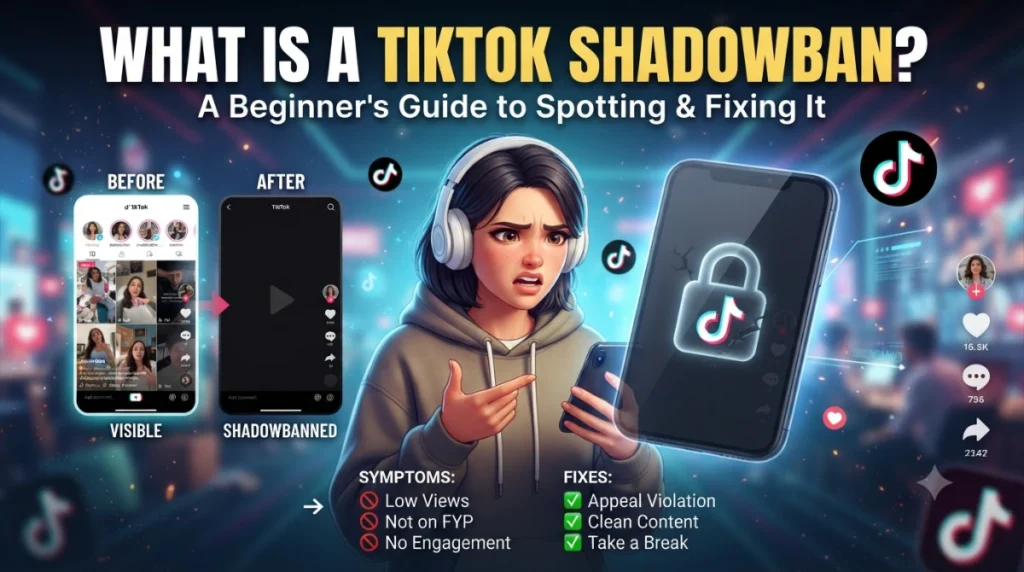
If your views tanked overnight and you’re staring at your analytics wondering what you did wrong, you’re not alone. This happens to creators constantly, and it has a name: a TikTok shadowban. It’s when TikTok quietly limits how many people see your content without ever telling you it’s doing it. Your account still works. You can post, comment, go LIVE, everything looks normal on the surface. But your reach quietly disappears.
Most creators land here after Googling something like “why did my views drop” or “TikTok not showing on FYP anymore.” A lot of them assume the worst right away. The truth is more complicated. Some of what looks like a shadowban is actually just normal algorithm behavior. Some of it is a real, policy driven drop in distribution.
In this guide, I’ll teach you how to tell the difference, how to run an actual TikTok shadowban check, and what to do to fix it if it’s real. Along the way I’ll point you to TikView, a tool that lets you review your public TikTok profile and activity so you’re working from facts instead of guesses. It won’t tell you “yes, you’re shadowbanned,” because no tool can say that with certainty. What it can do is show you your actual engagement, posting patterns, and recent video performance so you can make a smart call.
Quick Answer
A TikTok shadowban is when the app reduces how far your content spreads without notifying you. It’s not officially named by TikTok, but creators consistently report reduced FYP reach, missing hashtag visibility, and hidden comments after a guidelines violation or spammy activity. Most shadowbans clear up in a few days to two weeks once the flagged behavior stops. There’s no confirmed instant fix, but cleaning up the cause speeds up recovery.
What Is a TikTok Shadowban?
A TikTok shadowban is a drop in how widely your content gets distributed, without any notice, warning, or label from TikTok itself. Your account stays active. You keep your followers. You can still post and interact. What changes is invisible: the app simply stops pushing your videos out to new viewers on the For You Page.
This is different from an account ban or suspension. A ban is loud. You get locked out, you see a message, and there’s no mystery about what happened. A shadowban is quiet. Nothing in your app interface says “your reach has been reduced.” You only notice because the numbers don’t add up anymore.
TikTok doesn’t officially notify users about this because, as far as public statements go, TikTok doesn’t use the word “shadowban” at all. What TikTok does talk about, in its Community Guidelines and creator resources, is “reduced distribution” as a consequence of certain content or behavior. Whether you call that a shadowban or reduced distribution, the practical effect for a creator is the same: your videos stop reaching people.
TikView Tip: If you’re not sure whether your reach actually dropped or if it just feels that way, pull up your videos in TikView and look at view count trends over time instead of judging off one bad post.
Does TikTok Officially Confirm Shadowbans?
No. This is worth repeating because a lot of content online treats shadowbans as an official, documented TikTok feature, and that’s not accurate. TikTok has never published a policy that says “we shadowban accounts.” What TikTok has confirmed, through its Community Guidelines and public statements over the years, are things like:
- Content distribution decisions based on video quality, relevance, and policy compliance.
- Recommendation system adjustments that determine whose content shows up on whose FYP.
- Community Guidelines enforcement, which can include reducing a video’s reach as a penalty short of removal.
- Spam detection systems that flag accounts behaving in bot-like or inauthentic ways.
So when creators say “I got shadowbanned,” what’s likely happening underneath is one or more of these systems working as designed: TikTok’s recommendation engine decided your content, or your account’s recent behavior, didn’t meet the bar for wide distribution. It’s not a secret punishment room. It’s the algorithm and moderation systems doing exactly what they’re built to do.
I want to be careful here and not make claims TikTok hasn’t confirmed. Nobody outside TikTok, including creators, has access to the actual code deciding distribution. Everything past this point that isn’t a direct policy is based on patterns creators have reported consistently over time, and I’ll flag it as such.
Expert Insight: Don’t Mistake Low Views for a Shadowban
Here’s something I tell every creator who messages me panicking about a view drop: low views are not automatically a shadowban. In my experience helping creators sort through this, this is the single biggest misdiagnosis out there.
A few things that tank your views with zero policy issue involved:
- Algorithm fluctuations. TikTok tests different distribution patterns constantly. Some days your content gets a wider initial push, some days it doesn’t. This is normal and happens to accounts with zero violations.
- Weak hooks. If your first two to three seconds don’t stop the scroll, TikTok’s algorithm reads that as low interest and pulls back distribution on that video specifically. This isn’t punishment, it’s the system responding to weak watch time.
- Poor watch time. Even with a strong hook, if people drop off halfway through, the algorithm treats that as a signal the content isn’t holding attention, and it slows the push.
- Seasonal changes. Certain niches see real traffic dips at certain times of year. A fitness account might see slower growth in December. A back to school account might spike in August and go quiet in October.
- Audience fatigue. If you’ve posted the same format or topic repeatedly, your existing audience’s engagement can cool off, which then affects how far TikTok pushes new posts to fresh viewers.
Example: Say a cooking creator posts a recipe video that gets 200 views, way under their normal 5,000 average. That single video underperforming isn’t a shadowban. It might just be a weak hook, an oversaturated topic that week, or bad timing. Now say that same creator posts five videos in a row and every single one caps at 200 views, right after they got a Community Guidelines warning for a copyrighted sound. That pattern, tied to a specific trigger, looks a lot more like an actual reduced distribution event.
The lesson: one low performing video is data. A pattern across multiple videos, especially one that starts right after a specific incident, is a real signal.
Common Signs You’re Shadowbanned
Use this checklist to review your account. None of these alone confirms a shadowban, but several of them together is a strong signal.
- Videos consistently land below your normal view range, not just once but across several posts
- Your FYP traffic essentially disappears, with almost all views coming from existing followers
- Your video doesn’t show up under its own hashtag when you search it from a separate account
- Your username is hard to find in search, even for people who know your exact handle
- Comments you leave on other accounts are invisible to others, though visible to you
- Your impressions from the search tab drop to near zero
If you’re checking off three or more of these, especially after a specific incident like a flagged video or a guidelines warning, it’s worth digging deeper with the steps below.
Shadowban vs Normal Low Engagement
| Category | Normal Algorithm Drop | Possible Shadowban (Reduced Distribution) |
|---|---|---|
| Traffic | Views decrease but continue to fluctuate, with some videos still reaching new audiences. | Views drop sharply across multiple videos, with little or no reach beyond existing followers, especially from the For You Page (FYP). |
| Hashtag Indexing | Videos appear under the hashtags used and remain searchable. | Videos may not appear under their own hashtags, suggesting reduced indexing. |
| Search Visibility | Your profile and videos appear normally in TikTok search results. | Your profile or videos may become difficult to find, even when searching your exact username or title. |
| Comment Visibility | Comments are visible to everyone interacting with the post. | Comments may only be visible to you, while other users cannot see them. |
| Profile Search | Other users can easily find your account by searching your username. | Your profile may not appear in search results or may rank much lower than expected. |
| For You Page (FYP) | Videos continue to receive some exposure through the FYP, even if performance varies. | FYP impressions drop dramatically or disappear almost entirely across several uploads. |
| Analytics Pattern | Performance varies from post to post, with occasional dips and recoveries. | A consistent pattern of unusually low views and impressions appears across multiple consecutive videos. |
| Recovery | Performance often improves after publishing stronger or more engaging content. | Recovery typically requires stopping the behavior that may have triggered reduced distribution and allowing time for the account to recover. |
Why TikTok May Limit Your Reach
- There are several known and widely reported reasons distribution gets reduced. None of these are guaranteed to trigger a shadowban every time, but they’re the most common causes creators and TikTok’s own guidelines point to.
- Community Guideline violations. This is the most direct cause. If a video gets flagged for violating a specific rule, whether that’s harassment, misinformation, or restricted content, it’s common for reach to drop on that video and sometimes across the account.
- Copyrighted music. Using audio you don’t have rights to can get a video muted, taken down, or distributed less widely, since TikTok has licensing agreements it has to respect.
- Spam behavior. Rapid actions in a short window, like liking 200 videos in ten minutes or leaving the same comment on dozens of posts, reads as bot-like to TikTok’s spam detection.
- Repetitive content. Posting near identical videos over and over can get flagged as low quality or spammy, even if each one is technically original.
- Bots. Any third party tool that auto-follows, auto-likes, or auto-comments on your behalf is a major red flag to TikTok’s systems.
- Engagement pods. Groups of creators who agree to like and comment on each other’s content in coordinated bursts can trigger spam detection, since the pattern looks artificial.
- Misleading captions. Clickbait that doesn’t match the video content can get flagged, especially if users report it.
- Duplicate videos. Reposting the same video across multiple accounts, or reposting content that was already removed once, is a common trigger.
- Fake engagement. Buying followers, views, or likes from third party sites is one of the fastest ways to get flagged, since these services almost always show obvious bot patterns.
- Sensitive content. Videos that brush up against restricted topics, even without breaking a rule outright, can get reduced distribution as a precaution.
How to Check If You’re Shadowbanned
Here’s the important thing to understand before you run any test: no single check proves a shadowban on its own. You need to combine several checks and look for a consistent pattern. Treat each step below as one piece of evidence, not the final verdict.
Step 1: Check Your Analytics
Open Profile, then Menu, then Creator Tools, then Analytics. Look at your views over the last 7 to 14 days. You’re looking for a sharp, sudden drop rather than a gradual decline. A gradual decline usually points to content or timing issues. A sudden cliff, especially right after a specific post or warning, points toward something more serious.
Step 2: Check FYP Traffic
In your video analytics, look at the traffic source breakdown. If “For You” traffic has dropped close to zero and almost everything is coming from your own profile or followers, that’s one of the clearest signals something changed in how TikTok is distributing your content.
Step 3: Run a Hashtag Test
Post a video using a hashtag nobody else is using, something like #TestYourReach2026. Log out, or use a separate device that isn’t signed into your account. Search that hashtag. If your video doesn’t appear within 15 to 30 minutes, your content likely isn’t being indexed properly.
Step 4: Search Your Username
Ask a friend to search your exact username from their own account. If they can’t find your profile easily, or it doesn’t show up at all in search suggestions, that’s worth noting.
Step 5: Check Comment Visibility
Leave a comment on a public video. Ask a friend to check whether they can see it. If it only shows up for you, you’re likely dealing with a comment shadowban.
Step 6: Review Community Guidelines
Go to Settings, then Account, then Community Guidelines. Check for any recent warnings or removed content. This is often the missing piece that explains everything else on this list.
Step 7: Compare Previous Videos
Look at your last 10 to 15 videos and chart the views over time. A single dip is normal. A cliff that lines up with a specific post, warning, or behavior change is a real signal.
Check Your TikTok Profile Before Assuming You’re Shadowbanned
Before you delete videos or overhaul your whole strategy based on a hunch, take a step back and actually look at the data. A lot of creators skip this step and end up making changes that don’t fix anything, because the real issue was never what they thought it was.
This is where TikView is useful. It’s not a shadowban detector, and it won’t claim to be, because no tool outside TikTok can confirm that with certainty. What it does is let you review your public TikTok profile clearly: your recent videos, engagement trends, posting consistency, and general activity, all in one place. That gives you the actual picture instead of a guess based on panic.
With TikView you can pull up:
- Your recent videos and how each one performed
- Engagement trends across weeks or months
- Public profile information
- Likes and comments on your posts
- How consistent your posting schedule has actually been
Sometimes this reveals your account is fine and one or two videos just underperformed. Sometimes it reveals a real pattern worth investigating further. Either way, you’re working from evidence.
How to Fix a TikTok Shadowban
If you’ve gone through the checks above and you’re confident something is genuinely wrong, here’s the order I’d tackle it in.
- Stop any spam behavior immediately. Mass following, mass liking, and rapid fire commenting all need to stop right away.
- Remove any bots or automation tools. Disconnect any third party app that auto-engages on your behalf. These are one of the fastest ways to get flagged.
- Delete content that violated guidelines. If a specific video triggered a warning, take it down or set it to private.
- Update your app. Older app versions occasionally have bugs that affect how your content gets processed. Make sure you’re on the latest version.
- Clear your app cache. This won’t fix a policy issue, but it can rule out local glitches that sometimes mimic reduced reach.
- Consider a short posting pause. Some creators report that a brief break, a few days at most, gives the algorithm time to reset after cleaning everything up. This isn’t guaranteed to work and isn’t official TikTok advice, but it’s a commonly reported approach.
- Resume normal posting. Once you’ve cleaned things up, get back to your regular schedule. Disappearing for weeks tends to hurt more than help.
- Focus on original content. Reposts and duplicates are one of the more common ongoing triggers, so lean into content that’s clearly yours.
How Long Does a TikTok Shadowban Last?
Nobody, including TikTok, has published an exact timeline. Based on what creators consistently report:
- A few days for minor, first time issues once the behavior stops.
- One to two weeks for more established patterns of flagged behavior.
- Longer, sometimes months, if the violations continue or repeat.
If you’re at the three week mark with clean behavior and your reach still hasn’t recovered, that’s the point to reach out through TikTok’s in-app “Report a Problem” feature rather than waiting indefinitely.
Can You Remove a Shadowban Faster?
Short answer: not reliably. There’s no confirmed trick, tool, or setting that speeds up recovery beyond stopping the behavior that caused it in the first place.
Be especially careful of:
- “Shadowban remover” services. These are almost always scams. There’s no legitimate paid service that can reach into TikTok’s systems and lift a restriction.
- Buying engagement to “override” it. This tends to make things worse, since fake engagement is exactly the kind of pattern that triggers spam detection in the first place.
- Third party “shadowban checker” sites that ask for your login. Never give your TikTok credentials to a site promising to check or fix your shadowban status.
The most reliable path is boring but it works: stop the flagged behavior, clean up your content, and give it time.
Common Myths
| Myth | Reality |
|---|---|
| Deleting the TikTok app and reinstalling it removes a shadowban. | ❌ Reinstalling the app does not change your account’s standing or restore content distribution. Any reduced reach is tied to your account, not the app installed on your device. |
| Private accounts are automatically shadowbanned. | ❌ Switching to a private account limits who can view your content, but it does not trigger reduced distribution or a shadowban. |
| One report automatically gets your account shadowbanned. | ❌ A single user report rarely affects your account by itself. TikTok evaluates reports alongside its moderation systems and Community Guidelines before taking action. |
| Buying followers, likes, or views helps recover lost reach. | ❌ Fake engagement often makes the problem worse. Artificial activity can trigger spam detection and further reduce your content’s visibility. |
| Using too many hashtags causes a shadowban. | ❌ There’s no evidence that simply using multiple hashtags results in a shadowban. However, misleading, irrelevant, or banned hashtags may reduce a video’s visibility. |
| Deleting underperforming videos improves your account. | ❌ Removing videos that simply performed poorly is unlikely to improve your reach. Only consider deleting content that violates Community Guidelines or contains significant issues. |
| Using a VPN automatically causes a shadowban. | ❌ TikTok has not confirmed that VPN use leads to reduced distribution. However, unusual account activity or suspicious login patterns may trigger additional security checks. |
| Shadowbans are permanent. | ❌ Most cases of reduced distribution are temporary. Once the underlying issue is resolved and normal account activity resumes, reach often recovers over time. |
| Posting more frequently will instantly remove a shadowban. | ❌ Flooding your account with new uploads rarely fixes reduced distribution. Focus on high-quality, original content and avoid behaviors that may have triggered the issue. |
| Every sudden drop in views means you’re shadowbanned. | ❌ Not necessarily. Low views can result from weaker content, reduced watch time, seasonal trends, audience behavior, or normal algorithm changes rather than an account restriction. |
Mistakes That Often Trigger Reduced Reach
- Mass following or unfollowing large batches of accounts in a short time
- Leaving spam comments across many accounts quickly
- Reposting copied videos without changes
- Posting watermarked videos from other platforms
- Using misleading hashtags unrelated to your content
- Using copyrighted music or video clips
- Running automation or bot tools
- Participating in engagement pods
- Buying followers, likes, or views
Best Practices to Prevent Future Shadowbans
- Keep a steady publishing schedule. Spacing your uploads out tends to look more natural to TikTok’s systems than dumping five videos in an hour.
- Stick to original content. Reposts and duplicates are one of the more reliable ways to get flagged over time.
- Know your Community Guidelines. Check your account status periodically so you catch a warning before it becomes a pattern.
- Focus on meaningful engagement. Real comments and genuine interaction hold up a lot better than pods or bots ever will.
- Prioritize quality over quantity. A smaller number of well made videos consistently outperforms a high volume of rushed content.
Frequently Asked Questions
Conclusion
Don’t panic the moment your views drop. Most of the time, what looks like a shadowban is a normal fluctuation, a weak hook, or a timing issue that has nothing to do with any policy violation. Run the actual checks before you assume the worst. If you do find a genuine pattern, the fix isn’t complicated: stop the behavior that caused it, clean up your content, and keep posting original videos on a normal schedule.
If you want a clear look at your account before making any big decisions, analyze your public TikTok profile with TikView to review your recent content, engagement, and posting activity first.