
TikTok Video Downloader

Download TikTok videos in high quality without a watermark. Just paste the link and save instantly to your device—no app or sign-up needed.

  • 🔒 Secure Download
  • 🛡️ Fast Process
  • 🌍 Download Any Video

How to Download TikTok Videos for free using tikview.io?

Many TikTok users like to keep a copy of their favorite videos or audio files. Tikview.io makes this easy. Follow the steps below. The downloaded file is free of the TikTok watermark, making it easy to watch, share, or save for later.

Step 1: Copy the TikTok Video Link

Open TikTok, find the video you want to save, tap Share, and then select Copy Link as shown in the screenshot below.
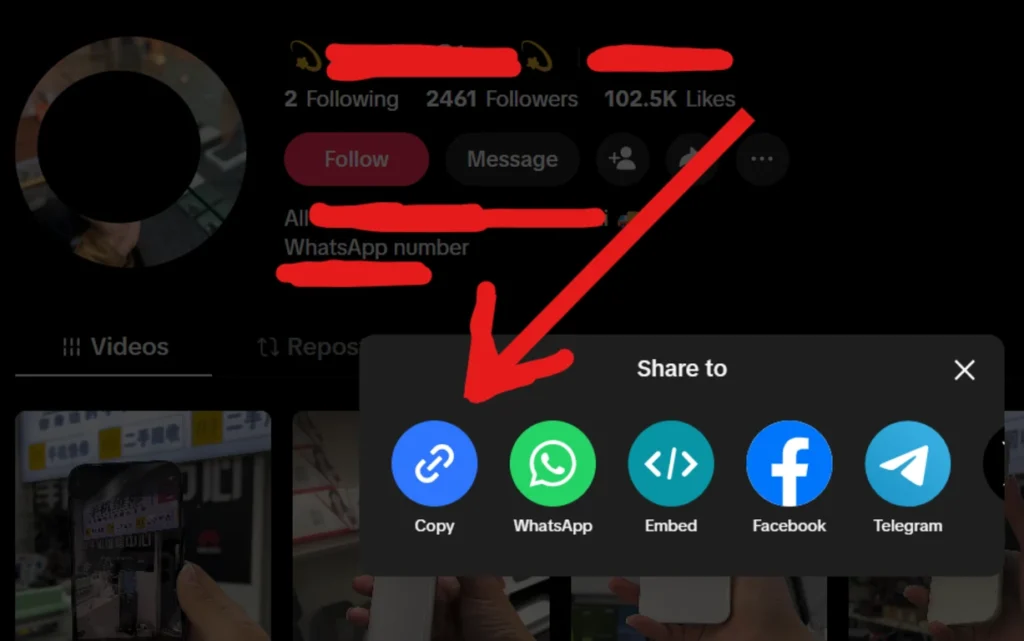
Copy the User Name or URL from Tiktok

Step 2: Paste the Link

Visit the TikTok video downloader at https://tikview.io/tiktok-video-downloader. Locate the main search input bar at the top of this page and paste the copied TikTok URL directly into the field, or download the TikTok video with the username. Click the pink “Explore” button positioned next to the search bar. The platform will immediately process the URL and retrieve the video details.
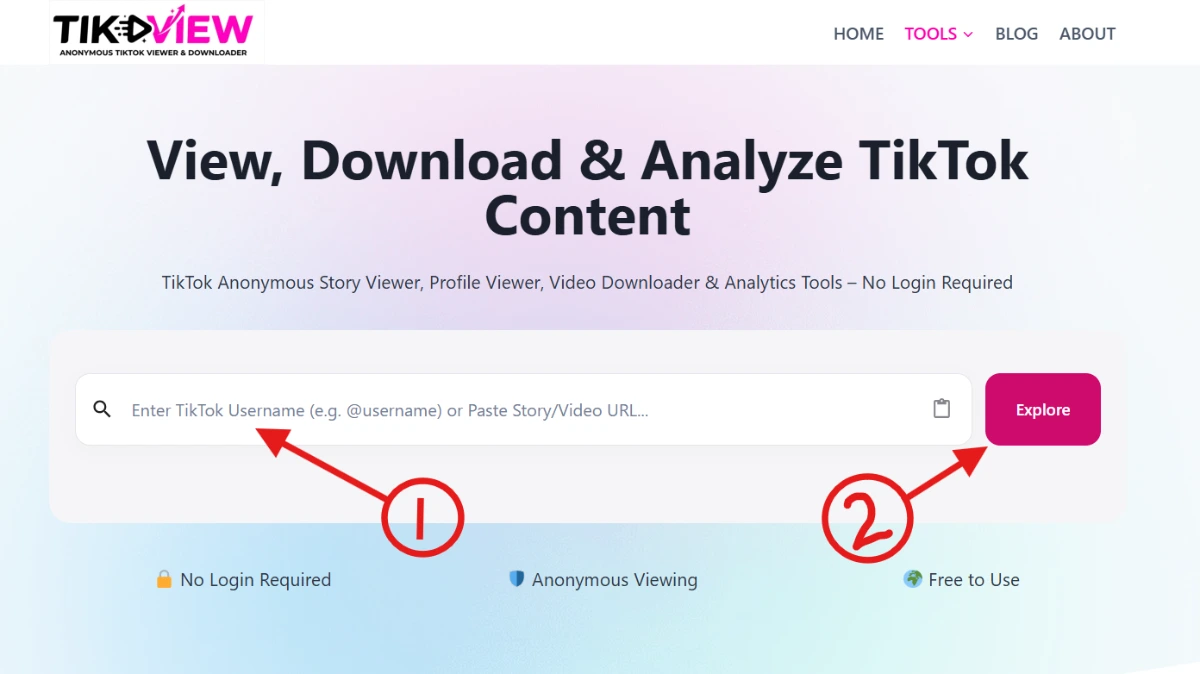
TikView.io homepage showing input box with username or URL and Explore Button

Step 4: Select Your Download Format

Once the processing is complete, a visual preview of the video will load, displaying relevant metadata including the original caption, view count, likes, and comments. Below this information, choose your preferred download option:

  • To save the video: Click the solid pink Download Video button to save the media file to your device.
  • To save the audio: Click the gray Download Audio button if you only want to extract and save the soundtrack.
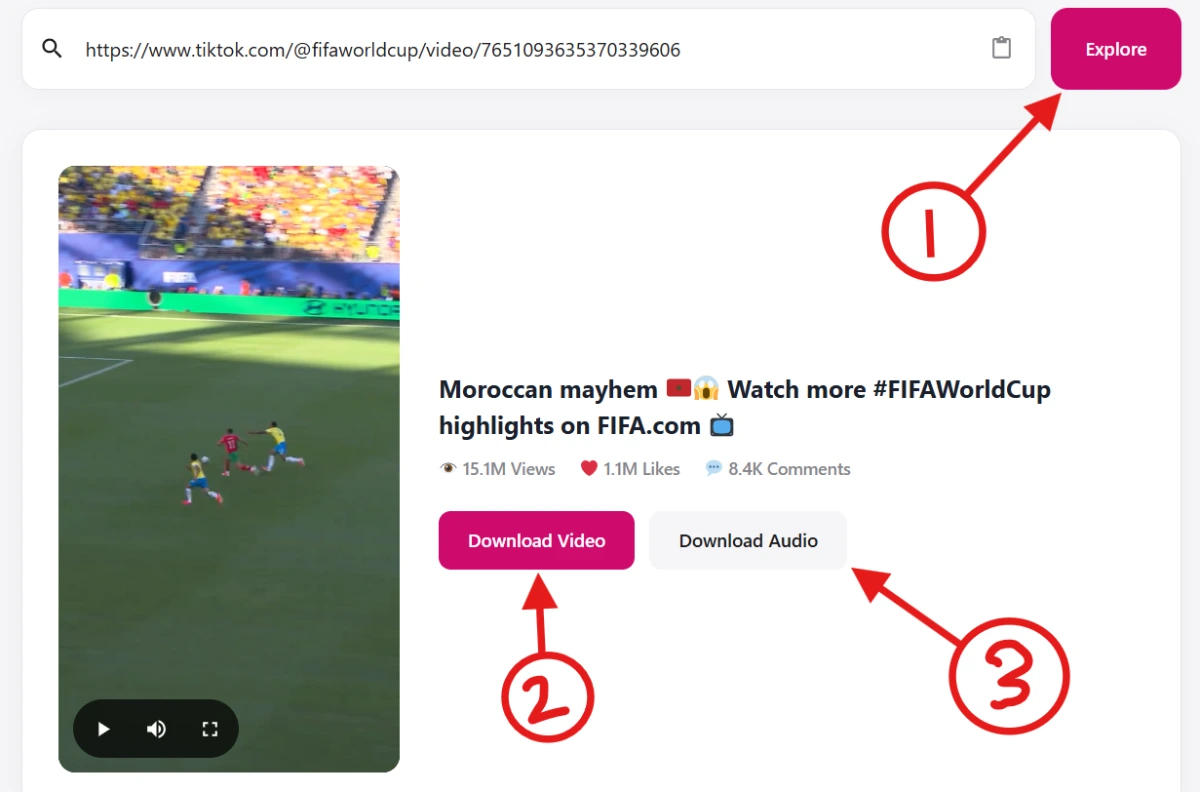
tiktok video downloader main screen

Key Features of the TikTok Video Downloader Tool

  • Direct URL Parsing: A prominent, accessible input field lets users paste TikTok links and process them immediately via the “Check Now” function.
  • Instant Media Preview: Once a link is processed, the tool generates an embedded video player so users can verify they have fetched the correct content before downloading.
  • Comprehensive Metadata Extraction: The platform automatically retrieves and displays the video’s original context, including the full caption, active hashtags, and real-time engagement statistics (Views, Likes, and Comments).
  • Dual-Format Downloading: Users have the flexibility to choose exactly what they need, with distinct buttons for downloading the full media file (Download Video HD) or extracting just the soundtrack (Download Audio).
  • Frictionless, Browser-Based Utility: The clean, distraction-free interface focuses purely on the task at hand, allowing users to fetch and download content rapidly without navigating complex menus or logging in.

Who Benefits from Our TikTok Video Downloader?

Our TikTok Video Downloader is designed for anyone who wants quick, hassle-free access to TikTok content without limitations. Whether you’re creating content, conducting research, learning new skills, or simply saving videos you enjoy, our tool makes the process fast and convenient.

Content Creators & Influencers

Protect and preserve your content by downloading your TikTok videos in high quality. Creators can easily repurpose content for Instagram Reels, YouTube Shorts, Facebook, and other platforms while maintaining a personal archive of their best-performing videos.

Social Media Managers & Digital Marketers

Stay ahead of trends by saving competitor content, viral videos, and popular audio clips for research and campaign planning. Build inspiration boards, analyze successful content strategies, and collect creative assets without interrupting your workflow.

Educators, Students & DIY Learners

Save valuable tutorials, educational clips, how-to guides, and training videos directly to your device. Having offline access allows you to review content at your own pace, revisit important steps, and learn without relying on an internet connection.

Businesses & Brand Teams

Monitor industry trends, track user-generated content, and collect examples of successful campaigns. Downloading videos makes it easier to share references with team members, develop creative concepts, and streamline content planning.

Everyday TikTok Users

Keep your favorite TikTok moments available whenever you need them. Save entertaining videos, recipes, travel tips, fitness routines, memes, and inspiring content for offline viewing, sharing with friends, or creating your own personal collection.

Researchers & Trend Watchers

Analyze emerging trends, viral formats, audience behavior, and content performance patterns. Downloading videos provides a reliable way to document and review trends before they disappear from your feed.

FAQs | TikTok Video Downloader

A TikTok video downloader is a web-based tool or app that lets you save TikTok videos directly to your device. Paste a TikTok link, click download, and the tool fetches the video file in MP4 format. Most tools work without requiring you to log in or install software.

Copy the TikTok video link from the app, paste it into a TikTok downloader tool, and select the “no watermark” option before downloading. Tools like SnapTik and SSSTikTok process the source file and strip the watermark before delivering the MP4 to your device.

Yes. Web-based TikTok downloaders work on any browser, so no installation is needed on PC or Mac. Go to the downloader site, paste the video URL, and save the file. For Windows users who want a dedicated app, several TikTok download APK ports and desktop clients exist, though browser-based tools are faster for one-off downloads.

Paste the video URL into the search field. The tool pulls a clean version of the video directly from TikTok’s servers, so the watermark never gets baked into the file. If you already saved the video with a watermark, redownload the video without a watermark from tikview.io by using the tool at “https://tikview.io/tiktok/video-downloader”.

Yes. TikView.io allows you to download multiple public TikTok videos from a creator’s profile using their username or profile URL. Simply enter the TikTok handle, and the platform will retrieve available public videos associated with that account.

This feature is especially useful for content creators, marketers, researchers, and social media managers who need to save videos in bulk for content analysis, trend monitoring, competitor research, or personal archiving. Instead of downloading videos one by one, TikView.io streamlines the process and helps you access public TikTok content more efficiently.

Please note that only publicly available videos can be retrieved and downloaded through the platform.

If you want to download TikTok videos without a watermark on your iPhone, TikView.io provides a fast, browser-based solution that requires no app installation.

Quick Answer

You can save a TikTok video without watermark by copying the video link from TikTok, pasting it into TikView.io, and downloading the processed MP4 file directly to your device.

Step-by-Step Guide

  1. Open the TikTok app on your iPhone
  2. Select the video you want to save
  3. Tap the Share button and choose Copy Link
  4. Open Safari (or any browser) and go to TikView.io
  5. Paste the copied TikTok URL into the input field
  6. Tap the “Check Now” button and wait for processing
  7. Click the “Download Video” button and wait to download the file
  8. Then find the video in your Photos or Files app

Key Benefit

TikView.io works entirely online, so you don’t need to install any app, log in, or use shortcuts. It provides a direct, clean download flow optimized for mobile users.

A TikTok video downloaded with a watermark has the creator’s username and the TikTok logo stamped on the video. A watermark-free version is a clean MP4 with no overlay, making it suitable for re-editing, reposting to other platforms, or using in presentations. TikTok’s built-in save feature always adds the watermark; third-party downloader tools can bypass it.

Yes. Most TikTok downloaders are free to use with no account needed. Tools like SnapTik, SSSTikTok, and TikSave offer free TikTok downloads in HD quality. Some tools cap daily downloads or add ads on free plans, but the core download function costs nothing.

Downloading TikTok videos for personal use is generally tolerated, but redistributing or monetizing someone else’s content without permission can violate TikTok’s terms of service and copyright law. Downloading your own videos, saving content for offline personal viewing, or archiving public domain content carries the lowest legal risk. Always credit original creators when reposting.

No. TikView.io does not require a TikTok account to download videos. You simply paste a public TikTok video URL into the downloader and the tool generates a downloadable file.

There is no need to log in, create a TikTok profile, or authenticate your account. The process works entirely through publicly available video links.

However, if a video is set to private or restricted by the creator, no third-party tool, including TikView.io, can access or bypass those privacy settings. Only publicly accessible TikTok content can be downloaded.

The simplest and safest way to download TikTok videos on Android is by using TikView.io directly in your mobile browser.

Instead of installing third-party apps or APK files, you can use TikView.io without any installation, login, or device permissions. Just copy the TikTok video link, open TikView.io in your browser, paste the URL into the input field, and tap the “Download Now” button.

The video is processed instantly and saved in MP4 format to your device’s Downloads folder, making it easy to access, share, or watch offline.

Using TikView.io removes the need for risky APK downloads and provides a clean, browser-based experience focused on speed, privacy, and convenience.