Why I wrote this guide
Last month a young creator messaged me. Her name was Hira. She had posted every day for three months and had 1,150 followers. Her cooking videos were doing well, and she was excited to go LIVE and meet her followers in real time.
She opened TikTok, tapped the + button, and found no LIVE button anywhere. She had also bought a ring light and a phone stand for her first stream. She wrote to me: “Myerson, I did everything right. Why doesn’t TikTok let me go live?”
I get this message almost every week. Most beginners think the LIVE button is broken, but they usually just miss one small requirement. So I wrote this guide to explain every requirement in plain words, so you don’t waste days feeling stuck.
The 5 main requirements to go LIVE on TikTok
1. You need 1,000 followers
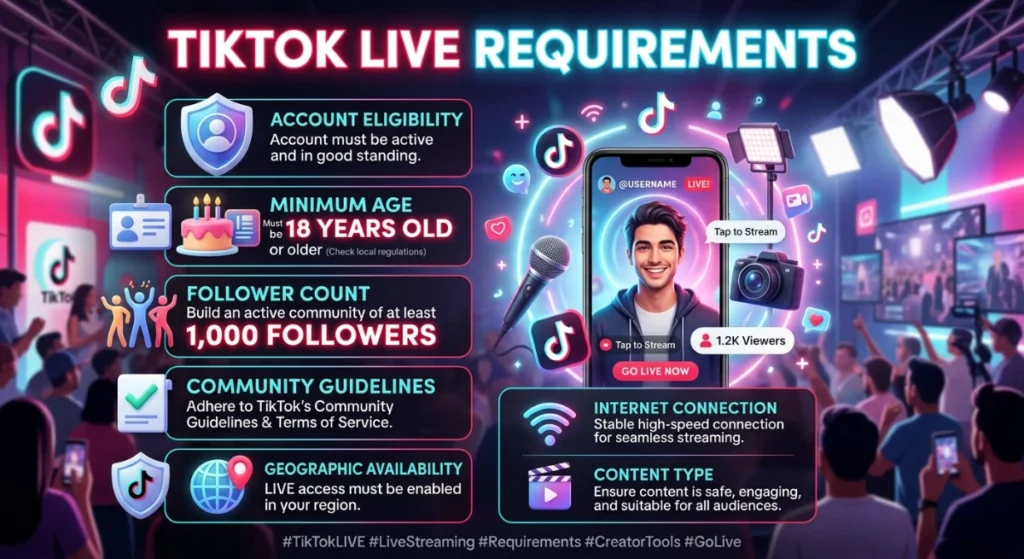
This is the main rule. The standard follower requirement is 1,000 followers, and once you reach it, the LIVE option appears automatically in your app.
You may also hear that some accounts get LIVE access with fewer followers. TikTok sometimes gives early access to selected accounts or in test regions, but there is no setting you can turn on to force it. Plan for 1,000 and treat anything earlier as a bonus.
2. You must be 18 or older
You must be at least 18 to go live and to send or receive LIVE gifts.
You may see older articles saying 16. Rules differ by region and have changed over time, so check what your own app says. Also make sure the birthday saved in your account is correct, because a wrong age in your account can hide LIVE even when you have enough followers.
3. Your account must be in good standing
Community Guidelines violations can temporarily or permanently disable your LIVE access. If you got a recent strike or warning, LIVE can stay locked even when your follower count is fine.
4. LIVE must be available in your country
TikTok LIVE is not available in every region. If you meet everything else and still can’t see it, region is one possible reason.
5. Your app and internet must be ready
- Update TikTok to the latest version.
- Use a stable connection. One guide suggests about 5 Mbps upload speed for smooth streaming.
Quick checklist
| Check | What you need |
|---|---|
| Followers | 1,000+ |
| Age | 18+ (set correctly in your account) |
| Account | No recent strikes or violations |
| Region | LIVE available in your country |
| App | Updated to the latest version |
| Internet | Stable and fast enough |
How to go LIVE once you qualify
- Open TikTok and tap the + button.
- Swipe to LIVE.
- Add a title.
- Tap Go LIVE.
That’s all there is to it.
Real example: Hira’s story
Hira had 1,150 followers, but the LIVE button was missing. Here is how we solved it, step by step:
- Followers: 1,150 is above 1,000, so this was fine.
- Age: When we checked Profile → Settings and privacy → Account, she had entered a wrong birth year when she signed up, which made the app treat her as underage. She had to fix this through TikTok’s age review process.
- Account standing: No strikes. Good.
- App version: She was two updates behind, so she updated it.
- Waiting time: Access is not instant after you reach 1,000, and the option usually appears within a day. She waited a day.
Her LIVE button appeared two days later. Her first stream had 40 viewers, and 9 of them were repeat followers who joined because they loved her recipes.
Lesson: When the button is missing, don’t panic. Go through the checklist one item at a time.
Can I go LIVE without 1,000 followers?
Some creators report other routes:
- TikTok LIVE Studio on desktop: Some guides say desktop streaming may be available to accounts under 1,000 followers in some regions. This is not guaranteed, because it varies by region.
- Agency or creator programs: One source says some official LIVE agencies can grant access without the standard follower count, but they have their own rules, such as a minimum account age and a violation-free probation period. Be careful here. Only join official, trusted programs and never pay anyone for “guaranteed access.”
Avoid these:
- Buying followers
- “Secret tricks” or settings that claim to unlock LIVE. Reported tricks like these do not work and may get your account flagged.
“Why is my LIVE button still missing?” fixes
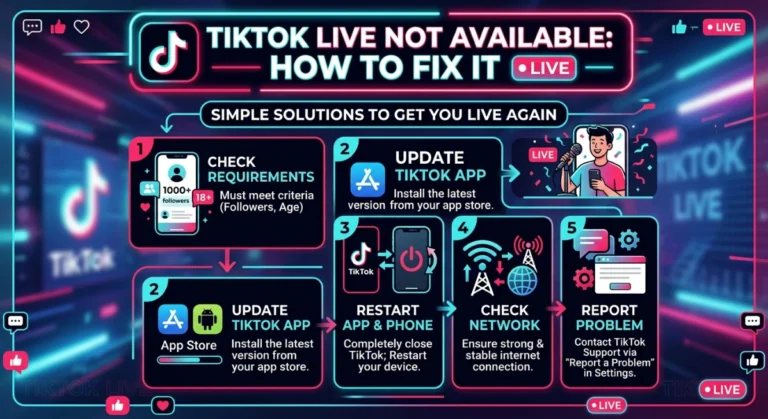
- Wait 24 to 48 hours after reaching 1,000 followers.
- Check your age in your account settings.
- Check for strikes in your account status.
- Update the app, or reinstall it.
- Restart your phone and log in again.
- Check your region to see if LIVE is supported.
Tips for your first LIVE
- Plan a topic. “Come and chat” is too vague, but “Making chicken karahi in 15 minutes” gives people a reason to stay.
- Test your internet and lighting 10 minutes before you start.
- Say hello to everyone who joins, using their names.
- Go live at the same time each week so your followers get used to it.
- Keep your first LIVE short, about 20 to 30 minutes.
- Follow the Community Guidelines, because one strike can take your access away.
Final words
To get TikTok LIVE access in 2026, you generally need 1,000 followers, an age of 18+, a clean account, an available region, and an updated app. If you meet all five and the button is still missing, wait a day or two and recheck the list. Don’t buy followers or chase shortcuts, because real, steady content is what gets you there safely.
You can do this. Keep posting, and your first LIVE will come sooner than you think.
Note: TikTok updates its rules often and they vary by region, so always confirm the latest details inside your TikTok app.